Lighting
- Check the Number of Lights Turned On You need to track which lights are turned on in your lighting array.
- Update the Lighting Array This could involve setting the correct state for each light in the array.
- Check Timer Light If the Sunlight trigger is active, increment the intSunlightCounter. If not, reset the intSunlightCounter to 0.
- Sunlight Counter Check After checking the sunlight trigger and updating the counter, wait for 1 second. If intSunlightCounter >= IntSunlightdelay, proceed with the following actions: Turn on each light if it is activated in the Lighting_Array. After the actions, delay for 2 seconds. If grow lights are enabled (intEnableGrowLights == 1), check which lights are turned on and trigger the respective streams.
If (Lighting_Array[1] == 1) Then Light1_DO = 1 ; EndIf
If (Lighting_Array[2] == 1) Then Light2_DO = 1 ; EndIf
If (Lighting_Array[3] == 1) Then Light3_DO = 1 ; EndIf
If (Lighting_Array[4] == 1) Then Light4_DO = 1 ; EndIf
If (Lighting_Array[5] == 1) Then Light5_DO = 1 ; EndIf
If (Lighting_Array[6] == 1) Then Light6_DO = 1 ; EndIf
DelaySec(2) ;
If (intEnableGrowLights == 1) Then If ((Light1_DO == 1) OR (Light2_DO == 1)) Then Stream1_GrowLight = 1 ; EndIf
If (Light2_DO == 1) Then Stream2_GrowLight = 1 ; EndIf
If (Light3_DO == 1) Then Stream3_GrowLight = 1 ; Stream4_GrowLight = 1 ; EndIf
If (Light4_DO == 1) Then Stream5_GrowLight = 1 ; Stream6_GrowLight = 1 ; EndIf
If (Light5_DO == 1) Then Stream7_GrowLight = 1 ; EndIf
If ((Light5_DO == 1) OR (Light6_DO == 1)) Then Stream8_GrowLight = 1 ; EndIf EndIf
DelaySec(intLightingOnInterval); 5. Check Timer Light Off If the timer light is off, reset the intSunlightCounter to 0. Otherwise, add 1 to the intSunlightCounter. 6. Turn Off Lights and Update Streams If the sunlight counter reaches the specified delay, proceed to turn off the lights: Set each LightX_DO to 0 (turn off). After a 2-second delay, check if grow lights are enabled and trigger the respective streams based on the light states. text Copy Edit Light1_DO = 0 ; Light2_DO = 0 ; Light3_DO = 0 ; Light4_DO = 0 ; Light5_DO = 0 ; Light6_DO = 0 ;
DelaySec(2) ;
If (intEnableGrowLights == 1) Then If ((Light1_DO == 1) OR (Light2_DO == 1)) Then Stream1_GrowLight = 1 ; Else Stream1_GrowLight = 0 ; EndIf
If (Light2_DO == 1) Then Stream2_GrowLight = 1 ; Else Stream2_GrowLight = 0 ; EndIf
If (Light3_DO == 1) Then Stream3_GrowLight = 1 ; Stream4_GrowLight = 1 ; Else Stream3_GrowLight = 0 ; Stream4_GrowLight = 0 ; EndIf
If (Light4_DO == 1) Then Stream5_GrowLight = 1 ; Stream6_GrowLight = 1 ; Else Stream5_GrowLight = 0 ; Stream6_GrowLight = 0 ; EndIf
If (Light5_DO == 1) Then Stream7_GrowLight = 1 ; Else Stream7_GrowLight = 0 ; EndIf
If ((Light5_DO == 1) OR (Light6_DO == 1)) Then Stream8_GrowLight = 1 ; Else Stream8_GrowLight = 0 ; EndIf EndIf 7. Delay and Recheck After completing the off-light actions, wait for intLightingOnInterval and then recheck if the sunlight trigger is active to continue the process. This sequence ensures that the lights are managed correctly based on both the sunlight trigger and the timer, with delays to synchronize the changes.
This is opto Scrip background code for Sun tracker
// At 3:00 AM each day, set the time of the control engine equal to the time
// of the PC, as specified by the strTimeFromPC string variable
// If the time stamp from Camile is more than about an hour different, something
// went wrong, so don't update the system time.

If (IsWithinLimits(GetSecondsSinceMidnight(), 10800, 10805)) Then
  GetSubstring(strTimeFromPC, 0, 2, strHours);
  GetSubstring(strTimeFromPC, 3, 2, strMinutes);
  GetSubstring(strTimeFromPC, 6, 2, strSeconds);
  intNewTimeValue = (StringToInt32(strHours) * 3600) + (StringToInt32(strMinutes) * 60) + (StringToInt32(strSeconds));
  If (IsWithinLimits(intNewTimeValue, 7000, 14600)) Then
    SetTime(strTimeFromPC) ;
  Endif
Endif

// If the current time of day (seconds past midnight) is between the sunrise
// and sunset times specified by the Camile computer, set the intSunlightTrigger
// variable to 1.  Otherwise set it to 0.

intSunriseSeconds = (intSunriseMinute * 60) + (intSunriseHour * 3600) ;
intSunsetSeconds = (intSunsetMinute * 60) + (intSunsetHour * 3600) ;

If (IsWithinLimits(GetSecondsSinceMidnight(), intSunriseSeconds, intSunsetSeconds)) Then
  intSunlightTrigger = 1 ;
Else
  intSunlightTrigger = 0 ;
Endif
Notes from User manual.
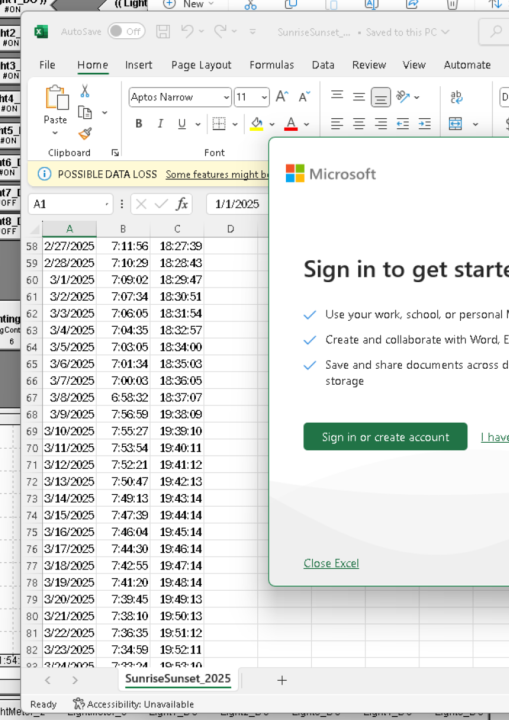
The Sunrise and Sunset are set by a CSV file. Note these files only exist through 2035. Should be fine but needs to be noted somewhere. I verified the sunrise and sunset values were correct. They are the ones showing up in Camile. They are also around the right time for this time of year.