Funtional_Specifications
HydroTrek - OPX
Functional Specifications
1. Document
OPX I version 2.0.0.17
OPXII version 2.0.0.21
File Location:
File Name: Design Specifications Documents: HydroTrek Energy Optimization Functionality of RMX Created by: Benjamin Chenevey Created: 5/1/2014 Revised: 10/3/2014
2. Vision Summary
The desired outcome of this application would be to have:
- a water utility decision making support tool
- a means to lower energy and operational cost while maintaining good hydraulic and water quality conditions throughout the network
3. Design Goals
Wanted to leverage existing HydroTrek software and create an additional extension that would:
- Run Model simulation
- Calculate sets of objective function results
- Generate new operation scenario and proceeds to the next iteration
4. Functionality
OPX is currently set up with two separate executable: OPX I and OPX II. A batch iterative run can also be setup to run the two programs in sequence for multiple iterations and results. OPXI and OPXII can run multiple parallel runs on the same machine.
4.1 OPX I
OPX I is set-up to run a normal RMX run (with a couple small differences) in a console window (no UI elements). Primary, OPX I is used to run the model and gather the detailed and summary output in the database (which is subsequently used by OPX II for objective calculation).
OPX I functionality is similar to RMX functionality, with model elements being updated via SCADA data:
- Initial Values
- The initial model pump and valve statuses are set by SCADA values.
- Pressure tags have been added for pump and valve objects.
- Initial tank levels are set in the model based on the SCADA values.
- The initial model quality is set by SCADA values (single species only).
- Model Demand Refinement
- System SCADA Demand (pump flows plus tank demands) is calculated for a timestep
- System model Demand (pump flows plus tank demands) is calculated for a timestep
- Demand patterns in the network are modified (increased/decreased) so that model = SCADA demand
- Additional Refinement
- System inputs (pumps, etc.) are opened and closed based on incoming SCADA data
It is important to note that two sets of functions are occurring within OPX. Initial tank levels and demand modifications will always be based on SCADA and be the same for all OPX I/II iterations for a given network. The pump operation (driven by SCADA status) will be adjusted via each iteration to create new pump status vectors and thus new operation scenarios.
One extra parameter is available to OPX I that is not in RMX. DurationInHours (defined in the XML file) controls how long the OPX simulation is run for. By default, this is usually 24 hours, but can be adjusted if more detailed/summary output is required. Additionally, the ClockRateInSeconds can be significantly dropped compared to RMX because no UI is being used. For many networks a value of 1 can be used (NOTE: this depends on the network and computer; if the computer can handle a high speed, OPX I will crash).
OPXI can now have the ability to retain Summary and Detailed output from a run (similar to that of RMX). The xml will now include "Retained Output section".
4.2 OPX II
OPX II is set-up to gather the detailed and summary output from an OPX I run, calculate and store a number of objective results, and generate a new set of random operations (pump status vectors) for the next OPX iteration.
A number of objectives are calculated from the detailed and summary results generated by OPX I. All objectives are calculated from model results. The following lists the current objectives that are calculated, and stored within the database (NOTE: these objectives must be within the Objective table of the database for them to be calculated by OPX II). Calculated objectives are stored in the ScenarioObjective table in the database.
- Produced: Total volume of water put into the network (by all system inputs) over the time period
- Total_Pumpage: Total volume of water that has flowed through all pumps in the network over the time period
- Max_Tank_Level_Change: maximum drop in tank level between initial and final for the network (worst case)
- Model_Stability: simulation warnings issued by EPANET engine (1 = major errors, and results are not valid)
- Min_Tank_Chlorine: The lowest chlorine concentration across all tanks at any time during the simulation (worst case)
- Max_Tank_Age_Increase: largest increase in tank water age for any tank (worst case)
- Max_Tank_Age: highest tank age overall seen in the network at any time in the simulation (worst case)
- Worst_Tank_Turnover: minimum turnover rate for the simulation period across all tanks (worst case) (turnover rate of 0.33 equates to complete cycle of water in tank after 3 days)
- Pump_Duty_Cycle: The number of times pumps turn on over the simulation period (total across all pumps)
- Total_Energy: Total energy used by all pumps over the simulation period
- Average_Power: average power used over the simulation period
- Tank_Demand: total volume of tank demand (positive = net fill, negative = net drain)
- Max_Inst_Power: largest instantaneous power reading at any timestep
- Pumping_Cost: total cost to operate all pumps over the entire simulation period
- Total_Energy_per_MG: total energy per volume produced
- Pumping_Cost_per_MG: total cost per volume produced
- Final_Storage: storage left in all tanks at the end of the simulation
- Fitness: calculated based on previous and current iteration whether the current scenario is better in all objectives (1 = better in some or all objectives, 0 = worse in all objectives)
- Demand_Change: the cost in dollars of the largest instantaneous power reading at any timestep
After calculating the objectives, OPX II gathers all status tags and values for the simulation and stores the results (for each pump) for that run in the PumpOperation table in the database. This way, detailed analysis can be done later for any scenario done during an iteration.
The next step of OPX II is to generate a new random set of operations for the pumps to be used in the next iteration. New operation is created by using random number generation to create a new set of status vectors that will be used by OPX I to operate the model.
There are five parameters that influence the random pump status vector creation. When running a normal OPX II run, these will be set one by one after selecting the database. If running a batch run, these can be changed by added values to the .bat file (see Batch section below). If .bat doesn't have these parameters, defaults will be used (see below):
- Pump Minimum Operation Time Stamp (7200 seconds)
- Minimum Random Number (-9)
- Maximum Random Number (109)
- Delta Random (15)
- Hydraulic Timestep in seconds (300)
Other than the first parameter, the rest deal with how the next iteration of pump status vectors are generated for the following scenario. Using these parameters can adjust the amount that pumps are operated on/off. Parameters are described in more detail in the figure below.

New pump status vectors are generated sperately for each pump, and override the status values in the transformed table of the SCADA database. Therefore, it is important to note that once OPX-II is run on a database, the original SCADA results for Status no longer remain in the transformed table, and subsequent runs of RMX will produce results that do not match historic SCADA data.
4.3 Batches
OPX can run in a batch of iterations for OPX-I and OPX-II.
The run a batch, the following files are needed (for Net3):
- Net3-Composite Chlorine-Conductivity-Age – THM.msx
- Net3-RMX_April2014_Bypass.inp
- Net3_OPX_Batch.bat
- OPX_Net3 - MSX.xml
The SCADA database that is required is the same as RMX:
- SCADA_Net3
Both OPX-I and OPX-II need to be installed prior to running a batch.
The .bat file has the format below. It contains parameters for the number of iterations (i), program exe file paths, and input file paths (xml and db3). Additional OPX - II iteration parameters are sequentially located after the db3 file path.
echo off SET /a i=0
:loop IF %i%==5 GOTO END echo This is iteration %i%. SET /a i=%i%+1 "C:\Program Files\GQC\HydroTrek-OPX-I\HydroTrek-OPX-I.exe" "C:\Users\gqc\Downloads\OPX\OPX_Net3 - MSX_GeoA.xml" echo second phase "C:\Program Files (x86)\GQC\HydroTrek-OPX-II\HydroTrek-OPX-II.exe" "C:\Users\gqc\Downloads\OPX\SCADA_Net3.db3" 7200 -9 109 15 300 GOTO LOOP
:end echo DONE!
OPX II accepts following arguments for it run in batch mode (e.g. 7200 -9 109 10 300)
1. Pump Minimum Operation Time Stamp (7200 seconds)
2. Minimum Random Number (-10)
3. Maximum Random Number (110)
4. Delta Random (15)
5. Hydraulic Time Stamp (300)
5. UI Specifications
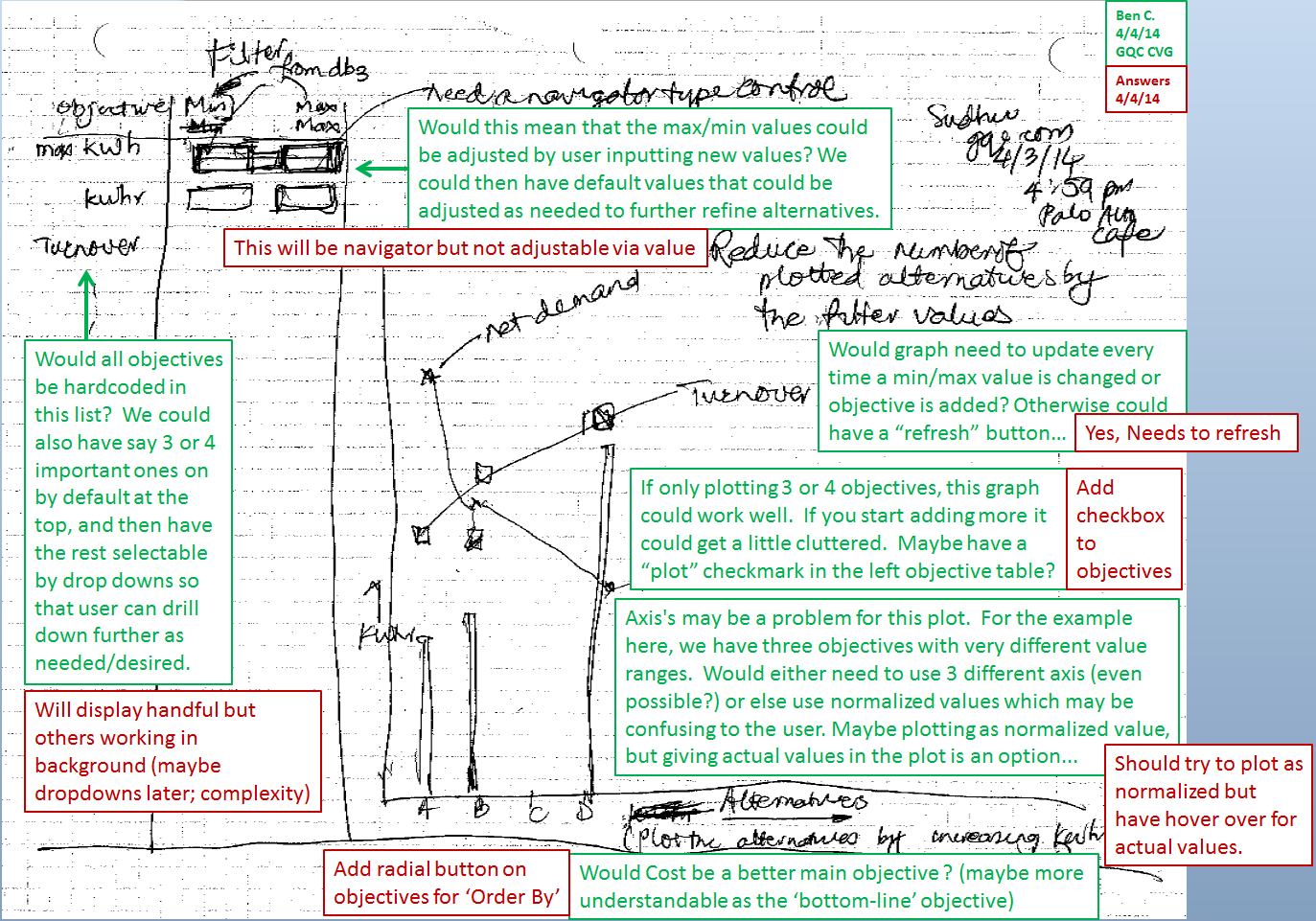
Currently, there are no UI elements of OPX and results must be viewed externally through the use of excel. Plans to add UI Elements for viewing OPX results have been discussed by Sudhir and Ben. Diagram below shows concerns and comments.
6. Design / Revision Discussions
Concerns and challenges are present with the current iteration of OPX I and II. The following are some discussions, followup, and additional considerations in terms of possible changes to design and functionality.
Concerns about OPX (from Ben):
- Run Time
- OPX iterations take a long time to run. A bigger network like LWC takes around 35 minutes for OPXI run and around 30 minutes for OPX2 run. This means doing a 100 run batch for decision making purposes is no longer reasonable. This long run time is compared to EPANET where LWC takes about 45 seconds for a twenty-four hour run. In my mind, the only benefit to an OPX run is the creation of detailed output which the objectives are generated from; otherwise a lot of the normal RMX functionality is really not required for an OPX batch.
- SCADA Oriented Model
- While RMX being SCADA driven is a major benefit, I see OPX being SCADA driven as a major limitation since it’s entirely a modeling utility. First is the tag requirement; this was a major task for LWC (I’m not entirely convinced that we captured all pumps for energy tags), and any new networks will need to take significant time to setup the database rather than being ready to show iterative results quickly. Second, OPX isn’t doing any unique SCADA adjustments other than maybe initial conditions. Pump status’s could be handled just as easily by rules for each iteration and even demand will in theory be driven by demand predictions rather than SCADA. Finally, our objectives are catching the big areas (tanks and pumps), but they are really not able to capture how well the whole network is performing since it’s limited to SCADA tags. Things like network-wide pressure (which I believe the program from UD is using as a major indicator) is current completely absent from our objective list. If there was a way to move away from the SCADA tag requirement but still be able to do similar objective queries on model results, it would improve the flexibility of the program.
- SCADA Oriented Model
After these concerns, Sudhir and Ben discussed some of these things and came up with the following comments:
- OPX-1 also adjusts the demands but if we have patterns from demand forecasts then we won’t need that (But that may be hard to do). RMX can easily modify the patterns based on the forecasts.The writing to the database takes time in any environment. In SWMM5 we store the results in memory and then write the blob (maybe we can do something similar).
- The minimum pressure requirement can’t be captured in the detailed table but it should be possible to review that once a candidate run is selected for further exploration. The UD approach has to watch them because their alternatives don’t necessarily get close to feasibility. Our generation stays close to feasibility in pumping and that should also cover the minimum pressure for the most part. An EPANET run that would look at the Network view in terms of pressure over time, would be one way to investigate post run.
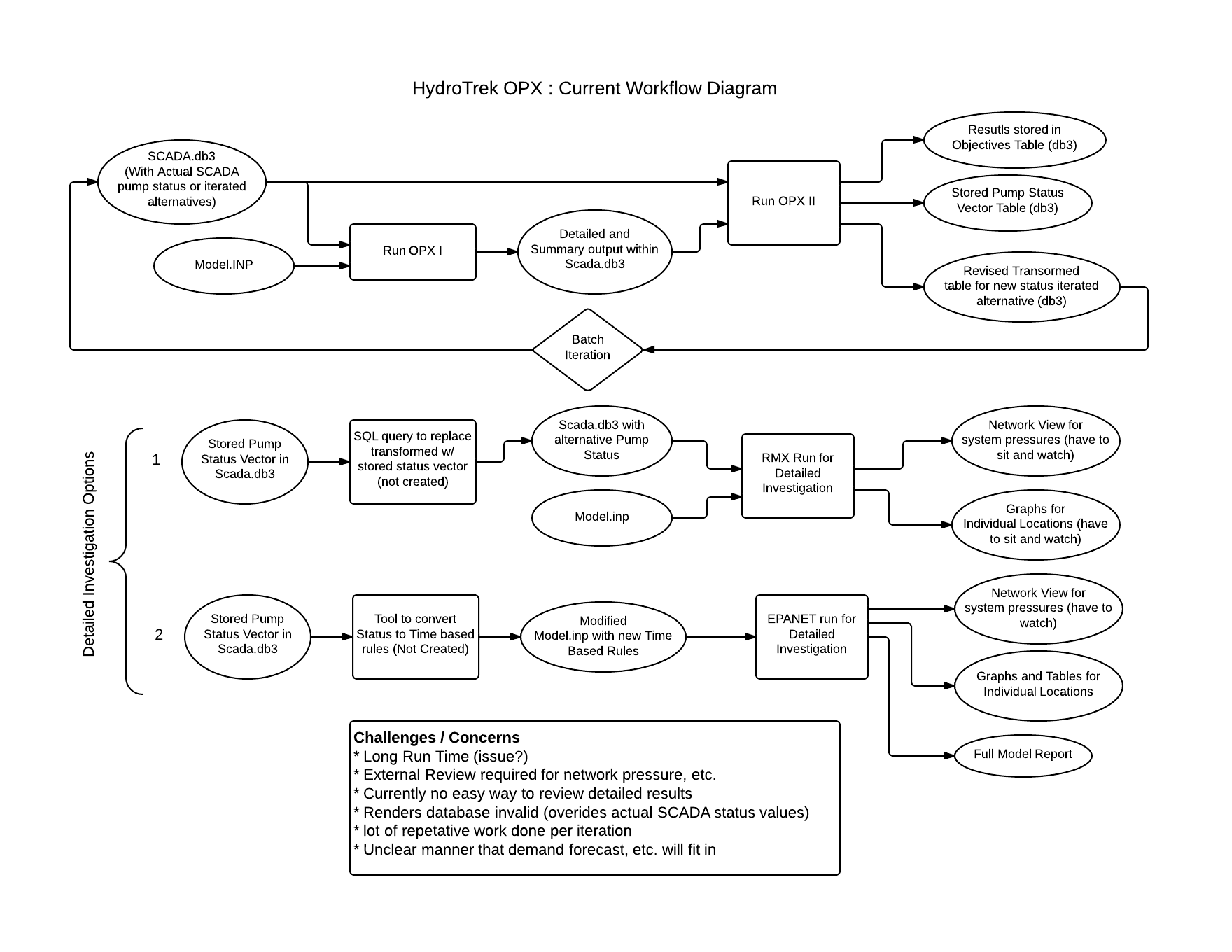
- We don’t have the ability to take a pump operation from the table and rerun it easily. We will need a tool to either create EPANET time based rules for external analysis in EPANET, or a way to write a particular status vector back into the transformed table, so that an RMX run can be made.
- Long run times may not be a big deal initially because most if the solutions are feasible and even if six good solutions get generated over-night, then that is a good start.
A diagram of OPX interactions required and performed for a batch file as well as what is needed to do more detailed investigations was developed (see image below). Additionally, a few more concerns were raised (including the fact that OPX II runs render the database invalid since they override historic status values).
6. Error Handling
OPXI
- The correct error log message is displayed for ENnextH errors.
OPXII
- OPXII does not throw an exception when OPXI throws the 110 exception. exception when OPXI throws the 110 exception. exception when OPXI throws the 110 exception.