SWMM Module High-Level Dataflow Diagram
High-level dataflow for the SWMM module: components, tech stacks, and Azure storage (Table, Blob, Queue) with read/write roles.
1. Component Summary
| Component | Tech stack | Trigger / role |
|---|---|---|
| swmm-frontend-react | React, Vite, ArcGIS JS API, MUI | Browser SPA; HTTP to API; optional Esri/Azure Maps |
| swmm-api-aspnet | ASP.NET Core, .NET 8, JWT, Swagger | REST API; reads/writes Azure Table + Blob; sends queue message; calls Feature Function HTTP |
| swmm-worker-function | Azure Functions (C#), .NET 8, Queue trigger | Queue swmm-trigger-rivershore; runs SWMM engine in-process; reads/writes Table + Blob |
| swmm-feature-function | Azure Functions (Python), HTTP trigger | Invoked by API (publish/delete layers); reads Table + Blob; writes ArcGIS + Table |
| swmm5_core | C# (.NET 8) + C++/CLI + native C++ | Shared libs: GqcStorage1, SwmmModels; SWMM 5 engine DLLs used only by worker |
2. Azure Storage
All storage uses one Azure Storage account (connection: CloudStorageConnectionString).
Legend: R = read, W = write, R/W = read and write.
Table Storage
| Table | Used by | Purpose |
|---|---|---|
| Projects | API (R/W), Worker (R/W), Feature Function (R/W) | Project metadata, publishing status |
| ProjectScenarios | API (R/W), Worker (R/W) | Scenario metadata, run status, run results resolution |
| ProjectFeatureMetaData | API (R), Feature Function (R/W) | Feature layer URLs and item IDs per project |
| ProjectSceneMetaData | API (R), Feature Function (R/W) | Scene layer metadata per project |
| SystemOutput | API (R), Worker (W) | System-level simulation results |
| LinkOutput | API (R), Worker (W) | Link simulation results |
| NodeOutput | API (R), Worker (W) | Node simulation results |
| SubCatchOutput | API (R), Worker (W) | Subcatchment results |
| Station | Worker (R) | Rainfall station data for INP rain file |
| Sensors, SensorsXRef | API (R) | Sensor definitions and cross-reference |
| ProjectNodeIndex | Manually built; future services (R/W, to be implemented) | Node index per project for fast node lookup and mapping |
| ProjectLinkIndex | Manually built; future services (R/W, to be implemented) | Link index per project for fast link lookup and mapping |
| ProjectLegendData | Manually built; future services (R/W, to be implemented) | Global min/max (and related legend data) for attributes like depth/flow |
Blob Storage
| Container | Used by | Purpose |
|---|---|---|
| swmm-input | API (W upload INP), Worker (R), Feature Function (R) | INP files per project: {projectId}/{InputFileName} |
| swmm-output | API (R), Worker (W) | Per-timestep simulation results; path includes project/scenario/run |
| swmm-slpk | Feature Function (R) | SLPK packages for scene layer publishing |
Queue
| Queue | Used by | Purpose |
|---|---|---|
| swmm-trigger-rivershore | API (W), Worker (R) | Trigger message: {projectId}_{scenarioId} to start a run |
3. Dataflow Diagrams
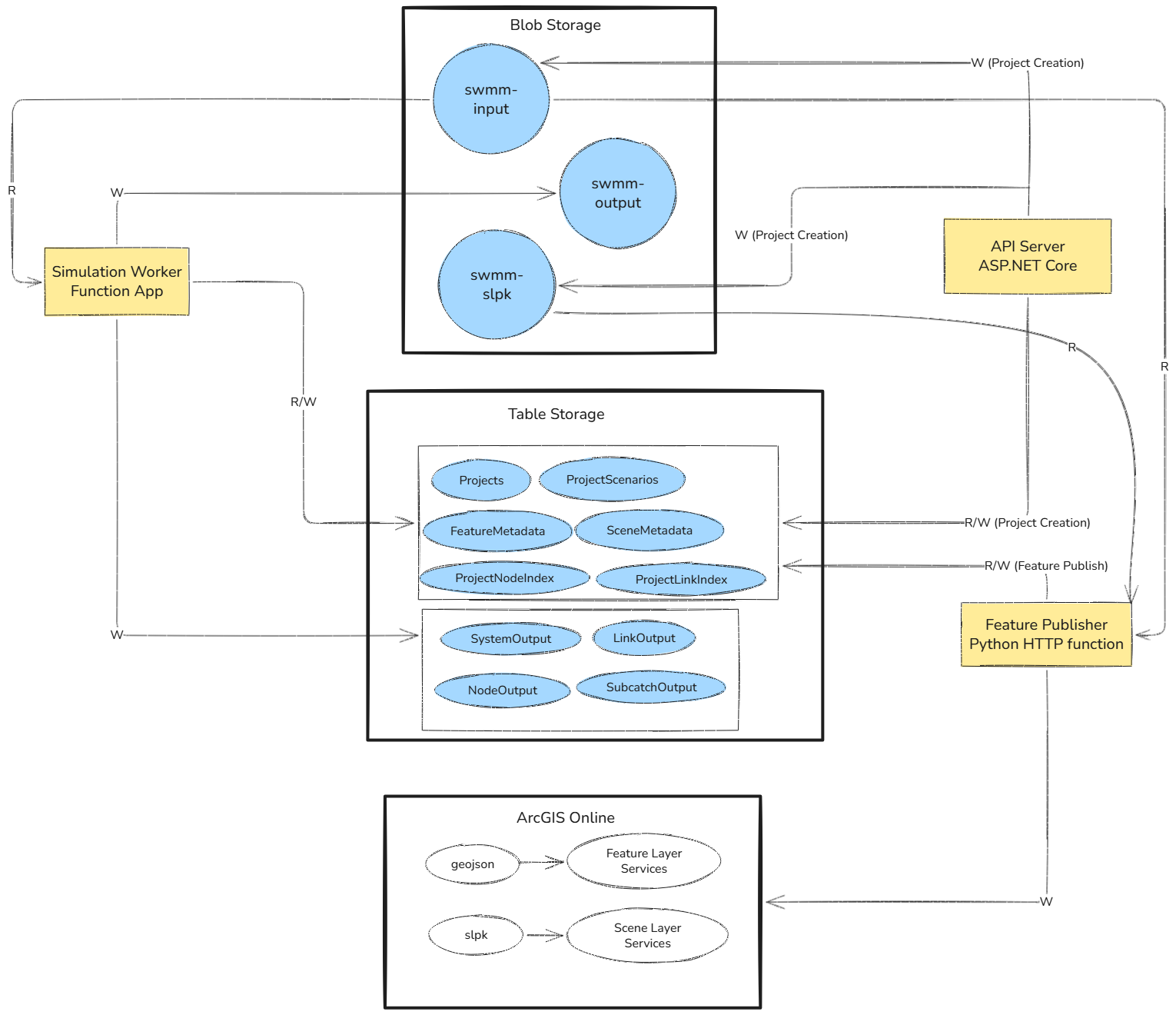
1. Compute Results and Publish Features Workflow
What reads and writes in what (Blob, Table, Layer Services).
2. Short end-to-end flow
Create → Run → Publish → View.
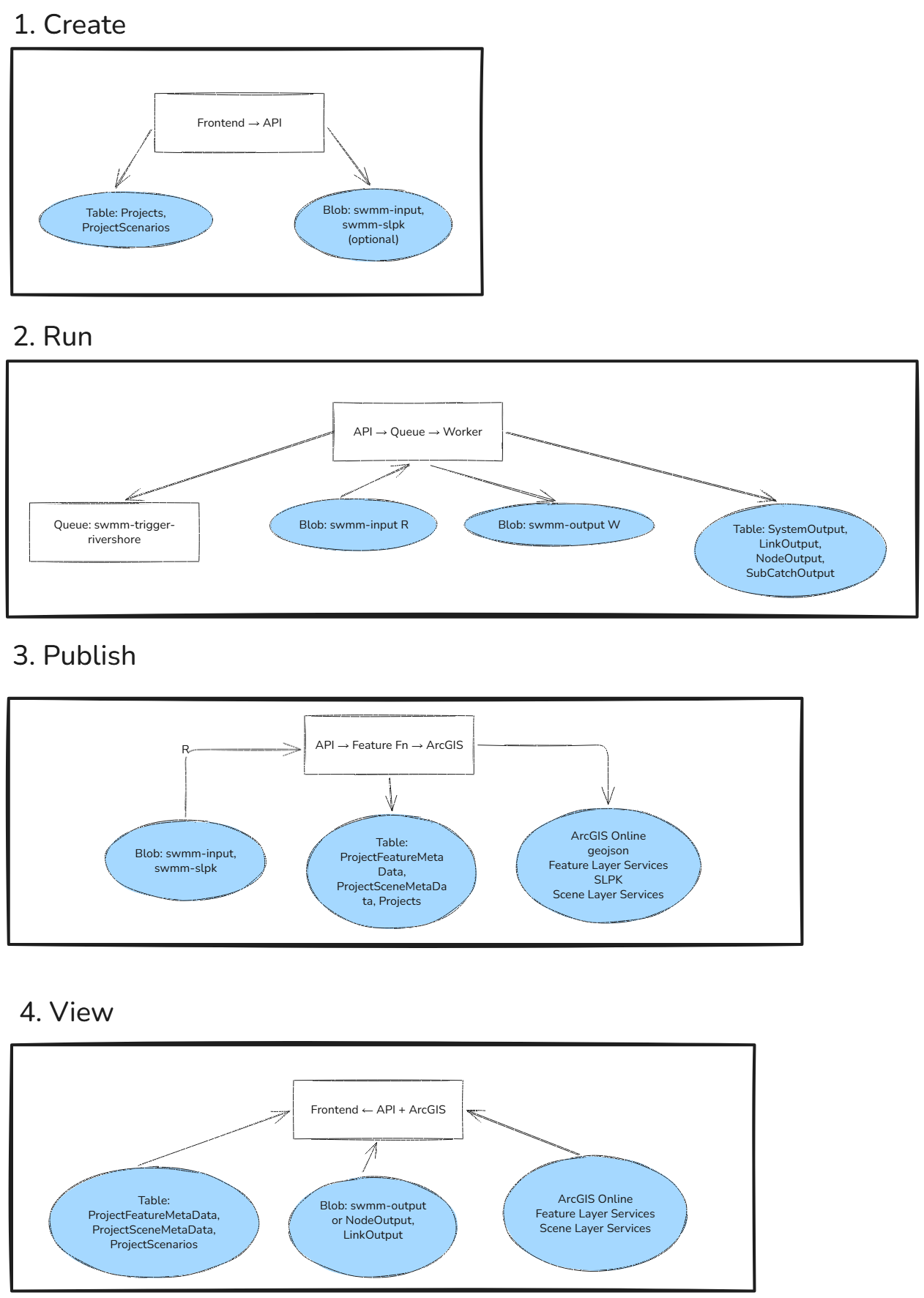
3. End-to-end flow (detailed)
Tables = Azure Table Storage; Blob = Azure Blob Storage. For easier zoom, paste the Mermaid code into Mermaid Live Editor.
4. End-to-End Flows
Project and scenario lifecycle
- User creates/updates project and scenarios in the frontend; API writes Projects and ProjectScenarios (Table) and uploads INP to swmm-input (Blob).
- User triggers a run: API sets scenario status (e.g. Queued) in ProjectScenarios and sends a message to swmm-trigger-rivershore (Queue). The worker consumes the message.
Simulation run
- Worker reads project/scenario from Projects and ProjectScenarios, downloads INP from swmm-input, and optionally reads Station for rainfall. It loads the swmm5_core engine in-process, runs the simulation, writes per-step results to swmm-output (Blob) and summary results to SystemOutput, LinkOutput, NodeOutput, SubCatchOutput (Table), and updates ProjectScenarios (status, duration, error).
Map layer publishing
- When publish is triggered, the API calls the Feature Function over HTTP (publish-project-layers, publish-scene-layers). The Feature Function reads Projects, ProjectFeatureMetaData, ProjectSceneMetaData, reads INP from swmm-input (and SLPK from swmm-slpk for scene layers), publishes to ArcGIS, then updates Projects (publishing status), ProjectFeatureMetaData (layer URLs), and ProjectSceneMetaData (scene metadata).
Viewing results
- Frontend requests project/scenario layers from the API; API reads ProjectFeatureMetaData and ProjectSceneMetaData and returns layer URLs. Frontend loads feature/scene layers from ArcGIS (using an Esri token from the API). For time-step results, the frontend calls the API (e.g. NodeResultsAtStep, LinkResultsAtStep); the API resolves the run from ProjectScenarios, then reads from swmm-output (Blob) and/or NodeOutput/LinkOutput (Table) and returns JSON.