TDEngine
Chaitanya Diwadkar
There are some novel concepts in TDengine which give us the performance and compression gains that we have over TimeScale and Influx.
Cloud - let me know if you have any issues signing up or anything. No credit card is required and in the free tier we keep your data for 30 days. During instance creation it gives you the option of creating a sample database with synthetic data from electrical meters.
Installing TDEngine Service
https://docs.tdengine.com/get-started/package/
OS: Ubuntu 20.04
wget -qO - http://repos.taosdata.com/tdengine.key | sudo apt-key add -
echo "deb [arch=amd64] http://repos.taosdata.com/tdengine-stable stable main" | sudo tee /etc/apt/sources.list.d/tdengine-stable.list

sudo apt-get update
apt-cache policy tdengine
sudo apt-get install tdengine
On the first node in your TDengine cluster, leave the Enter FQDN: prompt blank and press Enter. On subsequent nodes, you can enter the endpoint of the first dnode in the cluster. You can also configure this setting after you have finished installing TDengine.
Running the service
- To start the service
systemctl start taosd - Check the status
systemctl status taosd
This can be interfaced with TCEngine CLI, REST API or language client drivers
TDEngine C API
C Connector
Testing : https://github.com/gqc/TDEngine_trial
Example for RESTful API: tqdemo.c What is curl? link
Information on the database used for Sensor Mesh project
Database specifications
We have to decide the following
- Number of days to retain data (eg: 365 days)
- File partitioning interval (eg: Make a new file every 10 days)
- Write buffer size (Default is 96MB. Have to adjust based on the performance
- Check the all available options.
Creating the database
Using taos CLI
Open the CLI
taosExample Setup the database using SQL commands (details)
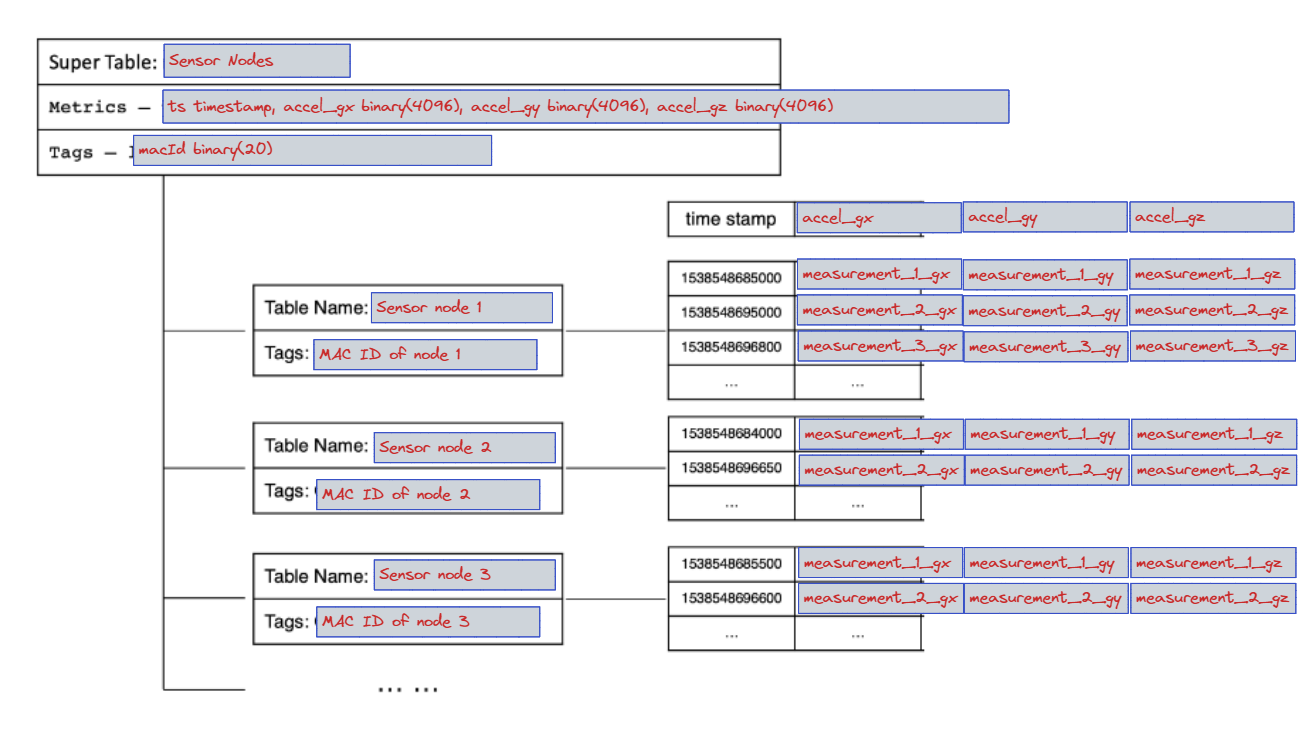
-- Create Database
CREATE DATABASE test; -- There are optional arguments: KEEP 365 DURATION 10 BUFFER 16 WAL_LEVEL 1;

-- Set the current table to the table we just created
USE test;

-- Create supertable
CREATE STABLE sensor_nodes_timeseries (ts timestamp, acceleration_gx binary(4096), acceleration_gy binary(4096), acceleration_gz binary(4096)) TAGS (MAC_ID binary(20));

-- Create table
-- The table name 'sensor_1' has to be replaced with a unique_id, probably MAC-ID
-- TAGS argument has to be the MAC-ID of the node as per our design
-- Every node in the system has to have a table of it's own
CREATE TABLE sensor_1 USING sensor_nodes_timeseries TAGS (201545654);

-- Alternatively the table can be created on the fly with the first data entry
-- If the table is already present, this will just append the new data into it
INSERT INTO sensor_2 USING sensor_nodes_timeseries TAGS (201545654) VALUES (now,02154564, 2224, 2555);
Tables used for displaying timeseries and FFT with grafana
CREATE TABLE IF NOT EXISTS current_timeseries_data (ts timestamp, time_dt int, amplitude_gx int, amplitude_gy int, amplitude_gz int)
CREATE TABLE IF NOT EXISTS current_serverFFT_data (ts timestamp, f_bin float, fft_gx float, fft_gy float, fft_gz float)
Backing up TDEngine data
taosDump- Install following instructions here
taosdump -D <DB_NAME>