Action Items
11/24/2023
- remove the dependancy of 'labelled_frames' and merge the additional columns in the 'labelled_frames' with 'frames' table itself.
10/06/2023
- Implement an option in the
training_data_splittingphase to drop the ND lables to 50% randomly.- Have it as an option in the YAML to control the percentage to drop.
The option isDROP_ND
- Have it as an option in the YAML to control the percentage to drop.
09/27/2023
Convert the
cctv_SD1_label_imagesnotebook as is to use yml passed in as an attribute from commandline.- Move the large label list variables into the DB as tables.
Migrate the
Prepare_CCTV_training_CSVcolab notebook togqc-utility-notebooksas a standard module.- Figure out how FB and VB splitting is done.
- VB code needs to be reimplemented to pick the videos randomly.
- Clean up and only keep the code for
SD1 - Should read from the DB
- Should we write to the DB? (It is generating multiple csv files as output. Need to plan how it is done)
- Figure out how FB and VB splitting is done.
Document everything!
all_conditionstable should have a column indicating the sourceDBname which contained the metadata.Commit SD1 PACP code file that Vannary sent me - Here is the link https://drive.google.com/file/d/15mW1g5S2KHtWlmXIxOxkWUz4rvBXtfgH/view?usp=sharing
- Need to include this file under utility specific metadata in the repository, since it's a standard file for SD1 utility.
- When we start the script running through CCTV Usage, it needs to be inserted into the DB through supplementary_data_import.
- Need to include the steps in the workflow (as text and in Mermaid diagram) about including Supplementary data (PACP_Code)
[Low Priority] Boiler plate for Database
- Discuss on how to handle creating single column tables for each variable in initialize_variables function in 'SD1_label_images.py'
- Each utility has a database like this specifically
-
Video_DB
Update in the CCTV workflow page, probably as warning, that metadata extraction notebook for creating 'all_conditions.csv' only runs on windows (windows access db) and that it gives warnings when it's not able to find tables to run SQL queries on.
09/05/2023
Running
SD1_DdatasetSD1_D all group run through the CCTV image processing pipeline: condition codes extraction from frames threw an error. Will be fixing that. I'll launch a run to blur images before signing out today.
- Details on
SD1-video-type-6is missing from the project page. I believe the following is forSD1-video-type-6and the title has a typo. But the screenshot needs to be corrected to include a frame which actually contains a defect code.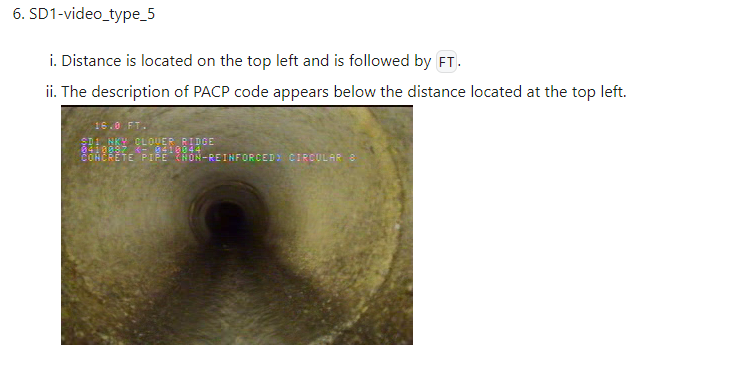
- Blurring frames on
SD1-Ddataset is complete.
- Details on
New script named 'fastai_multi_label_v3_generic.py' is created based on the multi GPU script but to switch between single GPU and multi GPU scenarios based on the switch in settings.py, 'MULTI_GPU'. All new changes are committed to
compute-msirepo.A test run is ongoing with the compute-msi, generic script in #2 on SD1_B dataset. Had to set RANDOM_WEIGHTS = True as otherwise it way trying to look for a pre-existing model in the repo, which isn't there. Wandb log:123_2023/09/01_17:01 | cctv-sd1-multilabel – Weights & Biases (wandb.ai)
- Sudhir: I think 3. is consequence of overloading some settings. We need to sort that out.
05/08/2023
- (Deven) Test metadata exporting based on the instructions here.
- (Pavan) Run mid-frame extraction on the METRO videos.
- (Pavan) Clean up the mid-frame notebook. - (30 min. + resolve merge conflict)
- (Srujana) Mark distance regions of 39 METRO videos using the streamlit app,
cctv-apps. Find a walkthrough here. - (Srujana) Code Review 'label lookup' notebook.
- (Pavan) Modify the frame blurring notebook to work with zip folders. Run image blurring NB on the extracted frames.
- (Pavan) Frame data extraction.
- Run 'label lookup' module.
Questions for Vannary
- How did you identify whether a video contains Stormwater, combined, and sanitary pipe for
COV,SD1andDNV?
05/02/2023
Questions for Vannary
Pavan: Following is a part of the dataflow diagram I'm putting together which captures the CCTV dataflow.
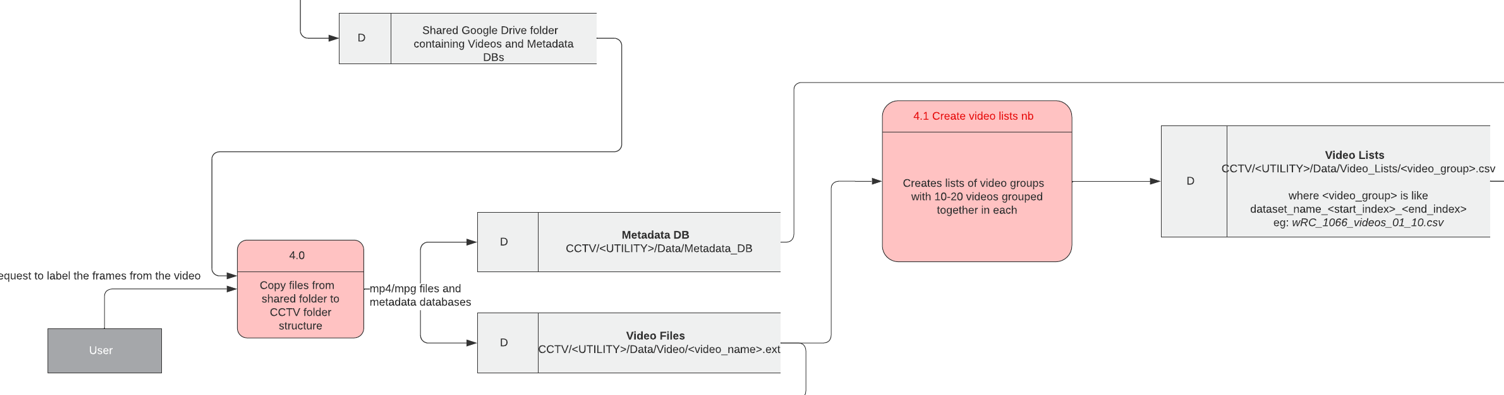 Can you help me refining the steps from a utility sharing a folder in google drive with us to arranging the data and creating the video lists?
- How exactly we copy the content to our folder structure ( what do you use to copy?)
- Create a shortcut folder and place the folder in
CCTV/<Utitlity>/Data/Uploaded_Data - Create a CSV file from DBs by including the following information:
cross_reference_id: referenced name between the video file name and name in DBs (in different utility this can be called asJOBNUMBER,INSPECTION_ID,..etc)Distance: the location of defectContinuous: continuous defect columnCode: the defect codeValue_Percent: the value in percent. This is needed for water level model- If utility has more than one DBs, concatenate mulit csv files into a single csv.
- Run zips-videos
- Use globtastic to get path to all the videos
- Create dataframe containing the
videofileandvideopathcolumns and save toCCTV/<Utility>/Data/Video_Lists/ - call function to zip the videos into the group of 10 by default into
CCTV/<Utility>/Data/Videos/and create a video list of each group and save toCCTV/<Utility>/Data/Video_Lists/
- Use rclone to copy those zip files to the
CCTV/<Utitlity>/Data/Videos/directory in Compute Canada
- Create a shortcut folder and place the folder in
04/25/2023
- Gradient based filtering for the distance values
- Make notebook
nbdevcompatible.
Questions for Sudhir
Should we have a central location for storing Utility DBs (metadata on the videos provided by the utility). e.g. PACP Access DB's
Sudhir: Go with the proposed data organization.
How to import utlitiy DBs into SQLite?
Sudhir: Manually for now
Revise the DB connection
Questions for Vannary
Utility DBs containing defect vs. distance info.
Where are we storing the utility DBs?
Vannary:
- The original DBs for the first 81 DNV videos and COV videos are stored on my local computer. The DBs for the rest of DNV videos are stored in folder in the same directory where Sean uploaded the videos to (
CCTV/DNV/data/video/January 2023 DNV upload/Condition Data/). - The original DBs for SD1 videos are stored in the folder where GQC shared with me (
CCTV/SD1/Data/videos/SewerVideoUploads) - I have converted all these DBs into cvs files. They are stored in
CCTV/<Utility>/Data/Condition_Data/for SD1 and COV andCCTV/DNV/data/condition_data_csv/for DNV
Pavan: We need to store them in a central location,
CCTV/<Utility>/Utility_Metadata_DB/- The original DBs for the first 81 DNV videos and COV videos are stored on my local computer. The DBs for the rest of DNV videos are stored in folder in the same directory where Sean uploaded the videos to (
How to access those DBs?
See point 1.
What different formats they have?
Vannary:
- Access DB
.mdb(first 81 DNV videos [3 different DBs], SD1 [11 different DBs] ),.dbf(rest of DNV [1 DB] ) .xlsxCOV videos [1 DB]
- Access DB
How the information is exported from DBs to csv files. Is is done manually or through code?
Vannary: Manualy
- 81 DNV videos and the rest of DNV videos: Export all DBs as a
.xlsxfrom Access GUI and convert it to CSVs. Finally concatanate all CSVs together. - 114 SD1 videos: Exported as a
.xlsxfrom Access GUI and convert it to CSV - COV videos: Convert
.xlsxto CSV
- 81 DNV videos and the rest of DNV videos: Export all DBs as a
How labelling was done using the defect DBs provided by utilties and the extracted distance fields?
Vannary:
- Create a CSV file from DBs by including the following information:
- `cross_reference_id`: referenced name between the video file name and name in DBs,
- `Distance`: the location of defect
- `Continuous`: continuous defect column
- `Code`: the defect code
- `Value_Percent`: the value in percent. This is needed for water level model- Create a CSV file that contains the video file name and its referenced name or id found in DBs.
- Use this notebook to label the images
- Input file paths
- Input path to the two CSV from point 1 and 2
- Input path to list of video csv file
- Input path to csv containing the extracted distance fields
- Input path to blurred images
- Input path to output file path
- Using the CSV file from point 2 to match the video to the referenced name found in CSV file from point 1
- Create list of defect from CSV file from point 1
- Using the referenced name to get the list of defects found in the video
- Grab the distance and defect from the csv file. Create two lists, one for point defects and another for continuous defects
- Remove list of codes that you want to exclude from training such as 'MGO'
- Using the referenced name to get the list of defects found in the video
- Clean up csv containing the extracted distance fields
- Use the preprocessing function to clean up the csv containing the extracted distance fields
- Convert value in
distancecolumns from string to float. Assign nan to the value if the value cannot be converted to float. - Find the start of the survey index, where the distance is reset to zero and the camera is inside the pipe, if video is from SD1 or COV. Only frame with this index onward will be labelled.
- Rename
frame_idtofname - Create
labelscolumn - The following functions will only work if we have
labelAbbrcolumn (results from running Azure OCR):- Find the end of survey surface distance by looking for
FHor any access point labels suchAMHin thelabelAbbr. This function can be modified by searching through the DBs instead of thelabelAbbrcolumn. - Replace the distance that is greater than the end of survey distance with nan.
- Drop any rows with
FHin thelabelAbbrand rows that come after it.
- Find the end of survey surface distance by looking for
- Replace distance with nan if the difference between the current distance and the previous distance is greater than 4 m for DNV and COV or 10 feet for SD1.
- Round the distance to nearest 1 decimal place. Some videos reported distance in two decimal place. However, the value reported in DBs was in 1 decimal place. Therefore, to match the exact distance in DBs, the distance should be rounded to 1 decimal place.
- Convert value in
- Do the distance interpolation
- Assign distance to row with nan by grabbing the distance from its closest neighbouring row.
- Use the preprocessing function to clean up the csv containing the extracted distance fields
- Assign defect code to images
- Get images that have distance between
- For DNV: distance of defect - 0 m <= distance <= distance of defect + 0.2 m
- For COV: distance of defect - 1 m <= distance <= distance of defect + 1 m
- For SD1: distance of defect - 4 feet <= distance <= distance of defect + 6 feet
- Assign defect code to images that have a high spatial correlation with true defect frame (>= 0.98)
- the first image with a defect code at each distance would be selected as the true image with the defect.
- if the defects were only presented in the access database and not the video, additional distances would be created for those defects, and the true image with the defect would be selected by grabbing the middle images from images that had the same distance as the additional distances found in the access database.
- Drop images without defect labels that have spatial correlation < 0.98. For DNV, drop images without defect labels that have spatial correlation < 0.98. and images located with 1 m from the defect distance.
- Assign other unlabeled images as ND.
- Save the output as csv. This file will be used to train the sewer defect classification model
- Get images that have distance between
- Input file paths
Video groups
- How were the video groups (video lists like
wRC_1066_videos_01_10.csv) created?- Use this notebook to create multiple csv files based on one input video list csv file.
- How were the video groups (video lists like
04/20/2023
- Method to clean the stitched image OCR distance value outputs
- Remove the first 40 rows from the dataframe of each video to skip the initial info screen phase of the video. (via Python)
- Remove outliers by binning the distance values together with a bin size of 5 and then dropping any bins which gets less than 5 items. (via SQL)
- Interpolate the blank distance fields (via Python)
SQL based results still had issues in terms of removing considerable amount of real-values along with the outliers. We went for a gradient based filtering method based on the dataset.
10/31/2022
- Implement a module for reading videos. Prevent any discrepancies which can occur due to code reuse in current implementation.
10/12/2022
- Project is on hold till the roadmap is cleared.
10/11/2022
- Test the fast.ai model for binary classification
- Compare the 3 methods of binary text detection using ROC metric.
- Repeat the Google Vision API based binary classification via cropped frames.
10/10/2022
- Add details on each step in the pipeline in the index.md
- Create a dataflow diagram for the current OCR pipeline
- Do an analysis on the Google API credits for videos
- Document the method of using distance information to find frames containing the defect around each label.
- Possiblity of using OpenCV TemplateMatching to achieve that.
- Add asserts to the colab notebook
10/06/2022
- Crop the frames to
700 x 470size. - Adjust the blur field sizes to cover up the margin of error.
- Generate blurred frames and label information
- Around 10 fps for regions of interest and 1 fps otherwise.
Older
- Test 10 sample images with Google vision and Azure
- Collab: Read video files directly and add rewinding feature
- Collab: Feed the fields to blur and gaussian blur them
- Test Google Vision API
- Create screening mechism to classify if an image contains text or not (Done using Google Vision API for now)
- Fetch text data using vision API
- Merge audio from original video to blurred vidoes.