Data organization
We specify the
PROJECT_PATHwhich is the root folder containing sub-folders by the different vendors likeDNVandSD1. The files are grouped together as 'zip' files because zipping is required for moving files betweenGoogle DriveandCompute Canadadue to limitations inCompute Canadain number of files and copy speed.
Directory organization
- We define the term
frame_idas<video_id>_<frame_index>where<video_id>is the name of the video without extension and<frame_id>is the zero-padded index of the frame consisting six digits. - We define the term
video_groupas a subset of a dataset provided by a utility. It can be either of the following forms:- Named as
<dataset_name>_<start_index>_<end_index>where<dataset_name>is the name we decided for the dataset,<start_index>and<end_index>are the indexes of the videos belonging to that dataset. (Order of the videos are decided by the default output ofPythonfastaiglobtasticfunction, which we use to scrape all the video files from the shared directory by the utility.) - Named arbitrarily based on subfolders or some other organization of the original dataset videos as provided by the utility.
- Named as
Relative to the PROJECT_PATH, folders should be structured as follows.
CCTV
New (1/29/2024)
As we identified DB performance issues with the DB file placed on the USB disk, DB file is relocated to a main hard drive location:
/home/gqc/cctv/<UTILITY>/db/cctv_<UTILITY>.db.cctv_settings.ymlnow has two paths for rest of the files and the DB root path (ForMSImachine):WORKING_PATH: '/media/gqc/unionsine2/cctv'
WORKING_PATH_FOR_DB: '/home/gqc/cctv'
── <WORKING_PATH_FOR_DB>
     └── <utility>
         ├── db
         |   └── cctv_<utility>.db
── <WORKING_PATH>
     └── <utility>
         ├──  data
         |    └── <dataset>
         |        ├── blurred_frames (has ZIPs)
         |        ├── extracted_frames (has ZIPs)
         |        ├── logs
         |        ├── received_data
         |        ├── temp
         |        └── cctv_settings.yml
         └──  scripts (optional)
Archived 2
── cctv
     └── <utility>
         ├── db
         |   └── cctv_<utility>.db
         |       └── Table arrangement needs to be finalized.
         ├──  data
         |    └── <dataset>
         |        ├── blurred_frames (has ZIPs)
         |        ├── extracted_frames (has ZIPs)
         |        ├── logs
         |        ├── received_data
         |        ├── temp
         |        ├── video_lists <-- This contains CSV files. Will change it to write directly to the db
         |        └── cctv_settings.yml
         └──  scripts (optional)
Archived 1
── CCTV
     └── UTILITY_X
         ├──  Data
         |    ├── DB
         |    |   └── cctv_<utility>.db
         |    └── Dataset_X
         |        ├── Blurred_Frames (has ZIPs)
         |        ├── Extracted_Frames (has ZIPs)
         |        ├── Logs
         |        ├── Received_Data
         |        ├── Temp
         |        ├── Video_DB
         |        |     └── Video_DB.db
         |        |           ├── videos
         |        |           ├── distance_bounding_boxes
         |        |           ├── video-groups-1_frames
         |        |           ├── video-groups-2_frames
         |        |           ├── video_defect_type
         |        |           └── condition_standard
         |        |           └── all_conditions
         |        |           └── labelled_frames
         |        ├── Video_Lists
         |        └── cctv_settings.yml
         └──  scripts (optional)
Old architecture
This is present in the folders found under
VS_Research/CCTV
CCTV→ This is thePROJECT_PATHwhich is the project root directory.<VENDOR_NAME>/→ e.g.DNV,SD1Data/Upload_Dir/→ Mount the shared folder in which the utility has uploaded the videos, DB and other info to this.Metadata_DB/→ Database files (.mdb,.dbf,.xlsx, etc.) containing condition data of the videos will be placed here. A readme file should be added which includes the metadata about the DB files and the steps to extract data out of it. Create a cross reference defining which DB contains what videos in the README.md itself.- README.md
DB1.mdbDB2.mdb- etc.
Metadata_CSV/→ Exported CSV files from theMetadata_DBs and extracted distance regions and video types will be stored here.Recieved_metadata.csv→ Exported CSV files from theMetadata_DBs.<DATASET>_video_types.csv→ result of video classification based on defect-annotation-style (using streamlit app)<DATASET>_distance_regions.csv→ result of the distance region marking (using streamlit app).
Video_Lists→ .csv lists driving the CCTV pipeline should be placed inside this folder. Each list will contain 10-20 videos which are grouped considering the limitations of file count limitations and transfer efficiency betweenCompute CanadaandGDrive.<video_group_1>.csv→ e.g.: wRC_1066_videos_01_10.csv<video_group_2>.csv- etc.
Videos→ zip files containing the videos belonging to each list put underVideo_listsdirectory<video_group_1>.zip<video_group_2>.zip- etc.
Extracted_Frames/→ Extracted frames from the videos will be saved inside this folder under zip files. Each zip file inside this folder will correspond to the video lists insideVideo_Listsfolder and each zip contains extracted frames from all the videos of the list. (with no sub-folders)<video_group_1>.zipframe_id_1.pngframe_id_2.png- etc.
Extracted_CSV/→ Lists of frames extracted from each video are saved in this directory inside zip files. Each zip file will correspond to the video lists inVideo_Listsdirectory and each zip will contain set ofcsvfiles corresponding to each video in the list.<video_group_1>.zipVideo_X.csvVideo_Y.csv- etc.
Azure_JSON/→ Following the same video list based organization as above, Azure OCR results for each frame will be saved inside corresponding zip files in.jsonformat.<video_group_1>.zipframe_id_1.jsonframe_id_2.json- etc.
Sample_Middle_Frames/→ This folder contains the middle frames extracted from each video of the utility and the corresponding json files.<DATASET>/→ Name of the paticular dataset. i.e.SD1_CFrames/JSON/
Blurred_Frames/→ Similarly, frames with all text fields blurred will be saved in the same zip structure.video_group_1.zipframe_id_1.pngframe_id_2.png- etc.
Frame_Data_CSV→ csv files containing frame data (distance, defect code, etc.) extracted from each frame will be saved inside this directory following the same zip based organization.<video_group_1>.zipVideo_X.csvVideo_Y.csv- etc.
Temporarily we are also saving intermediate data in this folder, which are used to share data between different post processing modules. These will go away with SQLite DB approach and after re-organizing the processing notebooks.
Distances_<video_group_1>.zip: This contains the output from the module extracting distance values using Azure OCR.Filtered_distances_<video_group_2>.zip: This contains the filtered distances fromDistances_<video_id>.zip.- This will be correlated with the Utility databases to identify the frames with defects and be saved to the final
<video_group_1>.zipabove.
File formats
Extracted CSV
A CSV containing extracted frame information per each video will be created.
This contains the columns
- frame_id → This takes the form
<video_name>_<frame_index>, where<frame_index>is the index of the frame padded with zeros to be a six digit number. - path → Path to the extracted frame from
PROJECT_PATH
Frame data CSV
A CSV containing label information extracted from frames per each video will be created.
This contains following columns
- frame_id → Same format as in Extracted CSV
- labelAbbr → Standard (e.g. PACP) label if present.
- And other columns corresponding to other fields found by label extraction.
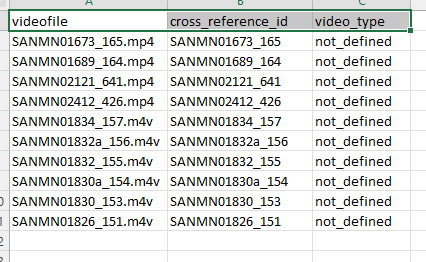
Video Lists CSV
A CSV containing videos belonging to each group
This contains following columns.