Setting Up a new Network
We will need to set up new networks in Chama.
File that need to be generate or need to exist.
- Rainfall File - dat file that contains the rainfall.
- Rainfall Meta Data - This has the rainfall file name and the start and end datetime for a rainfall event.
- Base INP file - an Inp file that you are creating your network for.
- Hot start File (Optional) - A Hot start file that is run for Pyswmm.
- Start Locations - A file that has start locations in the same coordinate system as your network.
- Config File - A new config file for the network Make sure you rename old config file then you can use the current one as config.
Modification of the Config File.
The sections that will need to be modified when you change the Network.
- inp_file: Example6-Final_base.inp
- subcatchments_centers_file: e6_subcatchments-centers-from-xy_only.csv
- rainfall_metadata_file: cvg_event_data.csv
- raingage_name: "CVG"
- Rainfall_Hotstart_filenames:
- 2005Jan02T22
- rainfall_hotstart_input: "./network_inputs/E6_Rainfall_Hotstart_files"
- model_name: "Example6"
Rainfall
In Example 6 I took the easy route and am just using the Rainfall that we already had from CVG. I was able to do this because the rainfall in E6 is fake anyway so rather than generate new rainfall. However if you do need to use specific Rainfall the following will need to be done.
Modify the config
The sections of the config that pertain to rainfall are as follows:
- rainfall_metadata_file: cvg_event_data.csv
- raingage_name: "CVG"
- Rainfall_Hotstart_filenames:
- 2005Jan02T22
- rainfall_hotstart_input: "./network_inputs/E6_Rainfall_Hotstart_files"
rainfall.dat file
Transform your rainfall data into a format that PySWMM can handle. We recommend the format Date Time value.
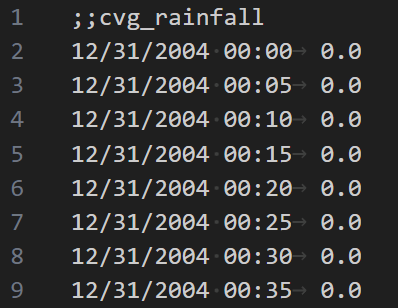
rainfall_metadata_file
If the rainfall event is a new event you will need to add it to the rainfall_metadata_file file this is a CSV and only contains the rainfall file name and the start date time and end date time for rainfall event.
Note that you can have rainfall files that you are not currently running in this file. The controls for what rainfall files are run during the ensemble are in the config file not in the rainfall meta data file.
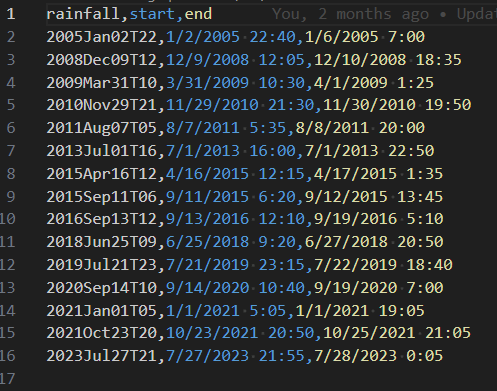
rainfall_hotstart_input
Creating a rainfall and hotstart folder specific for the E6 network is an optional step and should only be done if you are reusing rainfall data in a different network or if your rainfall event files have the same name. The reason for this issue is that the hotstart is a network specific file and it is named with the same name as the rainfall therefore 2 hotstart files could have the same name or you could easily use the wrong network hotstart. You do not want to overwrite the Banklick HotStarts.
We may want to change the Hot start file names to include the network in the future. It should be an easy modification.
How to Generate a Start Locations file from Subcatchment.
A subcatchment is represeted by a pollygone in the inp file. In order to launch the Plume we need a single x y coordnate in the same coordnates as the INP file Coord section.
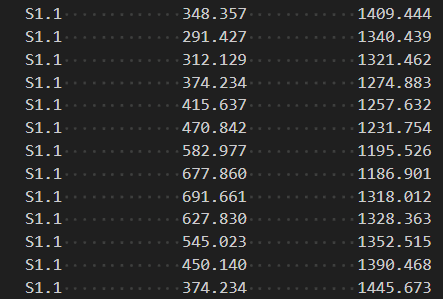
It has been decided to use the centroid of the subcatchments. A python script was created to give the centroid of the subcatchments.
from collections import defaultdict

# Define a defaultdict to store vertices for each polygon
polygons = defaultdict(list)

# Parse the data and store vertices for each polygon
data = """

"""
for line in data.strip().split("\n"):
    parts = line.split()
    polygon_id = parts[0]
    x, y = map(float, parts[1:])
    polygons[polygon_id].append((x, y))

# Calculate centroids for each polygon
centroids = {}
for polygon_id, vertices in polygons.items():
    num_vertices = len(vertices)
    centroid_x = sum(x for x, _ in vertices) / num_vertices
    centroid_y = sum(y for _, y in vertices) / num_vertices
    centroids[polygon_id] = (round(centroid_x, 3), round(centroid_y, 3))

# Print centroids
for polygon_id, centroid in centroids.items():
    print(f"{polygon_id},{centroid[0]},{centroid[0]}")
Simply Place the data in the data section and Copy the print section into a CSV.
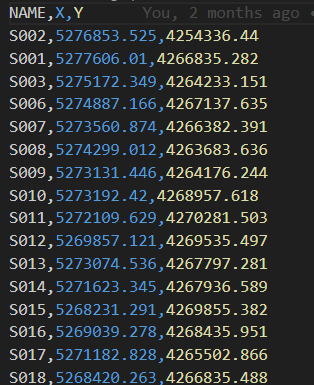
How to Modify the Base INP file.
Most of this is done progrmaticly. These are things you may want to check over before running.
- Make sure your rain gage name in the Config file is being applied to the subcatchments.
- Clean out old rainfall information. It will just bloat your files.
How to Generate a Hot Start File.
There are 2 ways to generate a Hot Start file.
- Run an inp file with the command to Save.

- Runs SWMM in the UI and export the Hot start file.