Creating the Ensemble
Update Ensemble
This is the Update as of 10/17/2023
The Ensemble will be generated based on the following criteria:
- Each subcatchment gets its own starting location, and there are 351 of these in the Banklick area.
- They have five rainfall files to throw into the INP file.
- They're playing with four or more wind directions.
- They might mess with bomb sizes. (This will be represented by amount of contaminate distributed with the plume.)
- There's also a chance they'll tinker with dispersion, specifically the Plume Standard Deviation.
An input file will be generated for each run based with a name based on these factors.
After the Input file is generated then PySWMM will be run the output of the run will be put into an ensemble hdf5 signal file. Where each signal file be a hdf5 dataset.
TODO High level overview of the rest of this project
- Create the test files for the rainfall, Standard Deviation, Wind Direction, Contaminate Size. These should be in a cofig/yaml file or CSV. Talk to Jake about it.
- Create a Python Script to Write the INP files.
- Read an INP file to get the Subcatchments.
- Generate the Plume
- Get Wind Direction Get Contaminate Size, Start Location
- Get rainfall
- Write out the INP file.
- Update the python code that runs pyswmm to do the following:
- Run PySWMM on all the INP file in a specified folder.
- Save the results of each signal file to a hdf5 dataset.
INP
What Do we need for the Plume Generation?
- We need the Subcatchment Name and the X and Y coordinate locations of the Subcatchment.
- This is not in the INP file it is in a CSV. Pull it out of the CSV and save it to a pandas df with column names: Subcatchment, X_coord, and y_coord note these locations are coord and not lat long.
- The Wind Direction written as a degree.
- Standard deviation Values
- Source Strength aka bomb or plume size currently set to 40000000000000 remember this is using Peco Curries
What do we need for Rainfall Generation?
- We need the base INP file to be cleaned out. We do not want a lot of rainfall timeseries data from Banklick that we are not using to clutter up the file and make it longer.
- The Timeseries Rainfall will need to be written in the correct format
Station ID, Year, Month, Day, Hour, Min, Value.
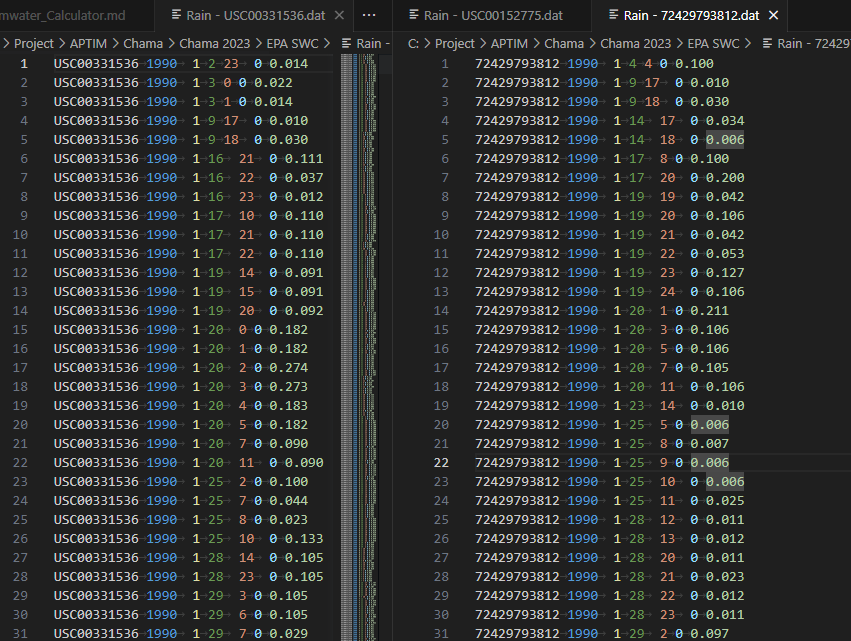 This is one of the formats that will work with SWMM however it is not the only one.
Station ID, Date, Time, Value.
This is one of the formats that will work with SWMM however it is not the only one.
Station ID, Date, Time, Value.
 Station ID, Date, Time, Value.
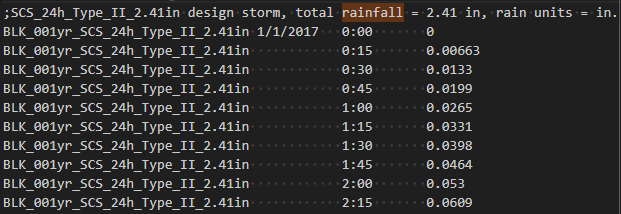 Station ID, Date, Time, Value.

- The second part that will need to be written is the raingages section.
- The third part will be the Subcatchment section.
How to Generate all the INP files? We will be going systematically through all options. There will be for or foreach loops applied here.
Talk through the order with Jake tomorrow. Should I make the rainfall 1st or last. if it is 1st then I am opening rainfall files less and making less changes. if it is last then I am generating less G-Plumes.
- For each rainfall Event should be the outer most loop. (This is either going to be the innermost or outer most loop as it is not part of the plume therefore I am making it the outermost as it will only be 5 rainfall files). Rainfall Will also need to modify the Start and End time of the simulation. How long should the simulation Last is a question that needs to be asked or a set value in the YAML.
- The Wind Direction written as a degree. There will be 4 - 6 options here. This number is not firm based on the number of runs in the Ensemble it may change.
- Standard deviation Values This will change the shape of the plume.
- Source Strength aka bomb or plume size currently set to 40000000000000 remember this is using Peco Curries
- The inner most loop should be for the Start of the plume this is the subcatchment of the plume. (It kind of makes sense that the inner most loop has the most iterations 351 in banklick.)
The Design
Have a Yaml file that will have the following.
- Name of a base banklick file.
- This file will be a cleaned up version of the current banklick file. (The cleanup is optional but I think it is a good Idea.)
- Timeseries should be cleaned up.
- Rain gages should be cleaned up.
- This file will be a cleaned up version of the current banklick file. (The cleanup is optional but I think it is a good Idea.)
- File path for the subcatchments-centers-from-xy_only.csv (we should probably rename this.)
- Number of hours the simulation should run. (This could also specify how many hours after the rainfall stops should the simulation run.)
- Array of Rainfall file names.
- Array of Wind directions
- Array of Contaminate amount
- Double array of Standard deviation amounts
In the Python program read in the Yaml file as args. Read in the INP file. Note the sections that will be modified.
- OPTIONS
- RAINGAGES
- SUBCATCHMENTS
- TIMESERIES These should be brought into a pandas dataframe 1 for each section so they can be modified easily.
for each rainfall file in the rainfall file array. 1st Loop read the Rainfall File.
- Get the start of the rainfall.
- Get the name of the rain station.
- Replace the Timeseries datframe with the current rainfall or add rainfall to the current timeseries.
- Add the rainfall information to the Raingages dataframe.
- Modify the Subcatchments rain gage column to the Name for the rainfall Station.
- Modify the Options section to
Before October 2023
The creation of the Ensemble will Systematic and the math will be easy to calculate the number of signal files and Runs that will need to be generated.
Banklick will be used for this example.
There are 2 levels for creating the Ensembles Chama Level and Signal Level. Chama Level are any variables that modifying them will require an additional Chama Run.
Signal Level are any variable that when modifying them will generate a new signal file.
For Each Chama run all the Signal Files should be run.
Chama Level
Possible Sensor Locations
Currently we are treating each subcatchment as a possible sensor Location.
Due to how long it takes to write up a signal file we have been doing things in smaller batches. There are currently 351 subcatchments. If we break it up into batches of about 25 subcatchments that would be 14 possible sensor Location Files 13 with 25 possible locations and 1 with 26.
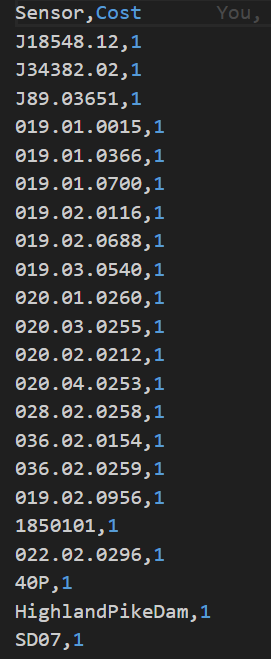
Currently all sensor placement cost the same if that changes or you want different runs where the cost has changed that will of course make more runs.
Chama Scenarios
There is also a Chama Scenario file that will is fed into the chama run. It will have the probability of each scenario.

Signal Level
Each of these wil create a new Signal File. It should be noted that the Possible Sensor Locations will be part of the signal generation but will be passed in through the Run. Therefore it will not be counted twice.
Rainfall
This will be a finite number of Rainfall files. For instance for the banklick area we have 5 raingages. If create a Light, Medium, and Heavy rain event for each gage that will be 15 rainfall files. I would not specify a specific day or time as the raingages are over 2 states and not close enough that a specific date would be good over all the days.
It would be good to get some criteria for what types of rainfall we are looking for. If we know the number of hours we want the simulation to run for we should be able to create a python script to read a rainfall CSV and categorized the rainfall for a specific rainfall range.
Should be looking purely the amount of rainfall or also the intensity of the rainfall. These could be very different rainfall.dat files as well.
Plume Generation
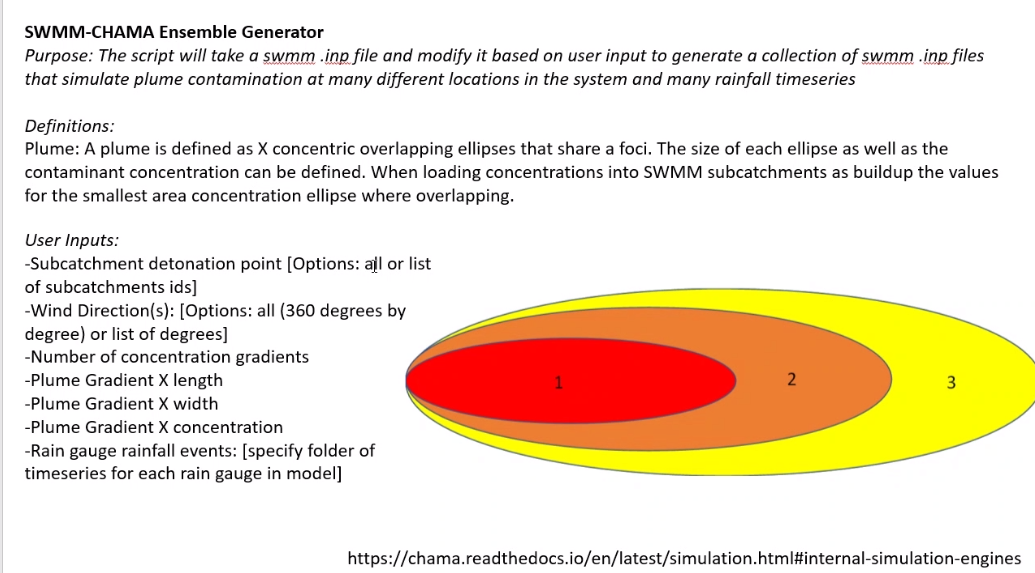
During Plume Generation we will need to take in several things into account. All of these variables are taken directly from Ann's Image during the kickoff of this phase. For the calculation of Plumes we are going to Low Ball all of these. Very Low. Note for banklick there are 351 subcatchments during the last phase we found that the subcatchment locations were good locations for our sensor placements in the scenario. Therefore the total number of possible sensor locations in the entire network is 351. The subcatchment centroids may also be good locations to create the start of our plumes. We could likely use nodes as well.
- Wind Direction - Either 360 degrees or a list of degrees
- For the basic calculation we will say a list of 90 degrees give us only 4 directions.
- Wind Speed
- Lets say 2 wind speeds for now.
- Pollutant amount
- 2 pollutant amounts.
- Concentration Gradients
- Lets say 3 High, Med, and Low
- Gradient X Length
- only 2
- Gradient Y Length
- only 2
- Start Location - only 5 possible start locations
- In reality we could have up to 351 if we use the same subcatchments If we use each possible Node Location we could hve even more. I am not going there right now.
Each of these will help generate a distinct Plume. The Calculation for each plume will be multiped. Wind Direction X Wind speed X Pollutant Amounts X Concentration Gradients X Gradient X Length X Gradient Y Length X Start Location
Plumes = 4 X 2 X 2 X 3 X 2 X 2 X 5 = 960 Possible Plumes. Each of these would generate a unique INP file.
Calculation
Signal Calculation
Number of Plumes X Number of Rainfall.dat files 960 X 15 = 14400 signal files per Run.
Run Generation
I am assuming that each run will only have 1 sensor cost and 1 scenario probability (The most likely version is each sensor cost the same and each scenario is equally probable.) So if all possible sensor locations are used then that is 14 runs. There for the Total Ensemble will be 14400 * 14 = 201600
It should be noted this will give you 14 best answers you may want to add an additional run for the best of the best sensor locations.
Additional Thoughts after overnight consideration
After giving this train of thought a bit of a break I agree Jake was right on the Ensemble creating the INP files and The Rainfall Files. The Inp files and Rainfall Files would be reuseable after for each run.
The client would have to make multiple runs with the signal files but I think I was thinking of this more as the Django process we do of SWMMOPT where we automate the process as much as possible. We should still do that but I was taking it a little far.
Instead I would modify the design to save inp files generated into a different folder and name them with with an auto incrementing folder or file name this should be the same as the ID in the database. Then the inp files would be reused again just like the rainfall files. I was over complicating it so I would break up my processes a little.
Tables
| Plume Inputs |
|---|
| Wind Direction |
| Wind Speed |
| Pollutant amount |
| Concentration Gradients |
| Gradient X Length |
| Gradient Y Length |
| Start Location |
Single Chama Opt Run
| Combined Signal File |