Chama Setup
Banklick Watershed
According to The Banklick Watershed Action Plan written by the Banklick Watershed Council there are 58 square miles in the Watershed.
Scenario and Sensor Location files
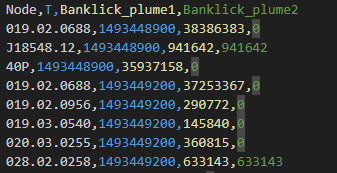
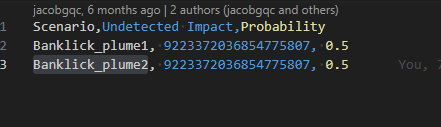
The Scenario contains the probability of a scenario aka a Single signal file. The name in the header column of the signal file must match the name of signal file.
Combined Signal File:
Scenario File:
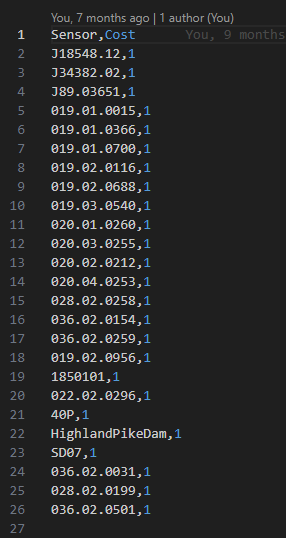
Possible Sensor Locations are the Nodes that have been chosen to monitor the pollutant Load. We are using the outfalls of the subcatchments. We currently have the cost of a sensor set at 1.
Banklick Sensor Locations:
Highlights from notes from Kate
For original notes please look at Kate's Notes
- With 1 scenario, only 1 sensor will be selected to minimize detection time or cover the scenario. With scenario-time coverage, you could get additional sensors placed.
- We are now using multiple scenario (2 currently) So we should be getting at least 2 results?
- Some of our potential sensor locations do not have signal data. This is still true as we are doing this for many different Plumes that should change. All of our sensors are not located in the same area for this reason. This does mean if sensor locations do not have signal data those sensors will never be selected in the optimization
- The budget should be in the same units as sensor cost. I see that each sensor costs 100, but the budget is 14934621000. This means that optimization will try to place all sensors. If you set the budget to a smaller value (for example, budget=200 will try to place 2 sensors in this example since they all cost the same amount). That said, this example will only select 1 sensor due to #1.
- The threshold is higher than all values in signals[‘S1’], which means that a sensor at any of those locations will detect the entire signal. I’m not sure if that’s intentional. The sensor threshold and signal should be in the same units. This was intentional. We need a low detection rate due to the contaminate.
- The Undetected impact should be higher than any T in signals. If it is lower it means that it’s better to not detect S1 and place no sensors when using the impact formulation.
- Keep in mind that optimization is most useful when the number of scenarios is much larger than the number of sensors, and certain sensors are better at detecting certain scenarios (the detection is not equal). Generally, the budget is set such that you can’t pick all the sensors to detect all the scenarios. That forces the optimization to choose the best combination, knowing that some scenarios (or scenario-time pairs) will go undetected
Running Chama
- Open a terminal window.
- Go to the chama python env
- cd into the project to the Chama22 level and open code at this level.
- cd chama_django level.
- Run the following commands:
- python manage.py migrate
- python manage.py createsuperuser
- Follow instructions I use gqc and gqc1 as the user name and password.
- Go to the Chama22 code window you have opened.
- Go to src
- Open generate_sig_input_file
- The Banklick config should be the config you are using it should be titled config.json if you need to modify the names of the config files in this folder.

- Inp_file is the correct inp file.
- scenario_name matches the inp File. The scenario name needs to be unique for the combined signal file later.
- "sensor_csv": "potential_sensors_25_locations.csv" - name of possible sensor locations file. This should stay the same no matter how many signals you generate.
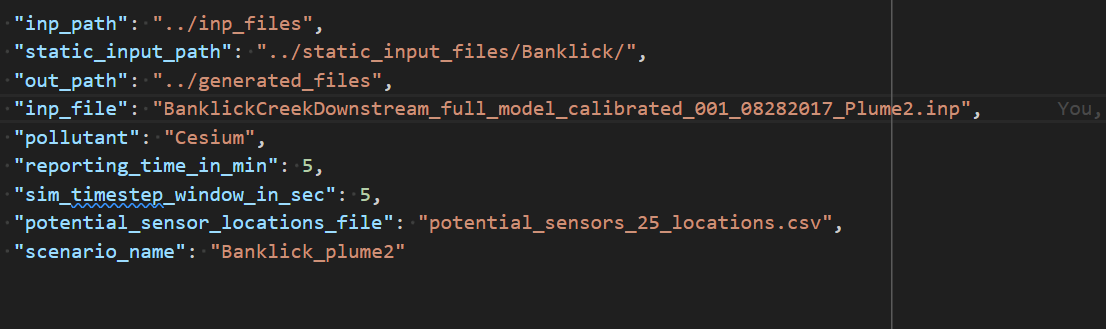
- The Banklick config should be the config you are using it should be titled config.json if you need to modify the names of the config files in this folder.
- In the terminal run python manage.py generate_chama_inputs
- Repeat steps 7 and 8 for each chama scenario aka signal file. Currently we can only do 2 signal files at a time.
- Open combine_signal_files folder
- Here there is only 1 config file to modify.
- You will need to find the signal files that you generated from pervious runs.
- Modify signal_file_path_1 and signal_file_path_2 Location and csv name.
- Modify the out_path I generally put it in the second folder.
- out_file_name should be named something like "combined_signal_file_Banklick.csv"
- In the terminal run python manage.py combine_signal_files
- Open run_chama folder
- The Banklick config should be the config you are using it should be titled config.json if you need to modify the names of the config files in this folder.
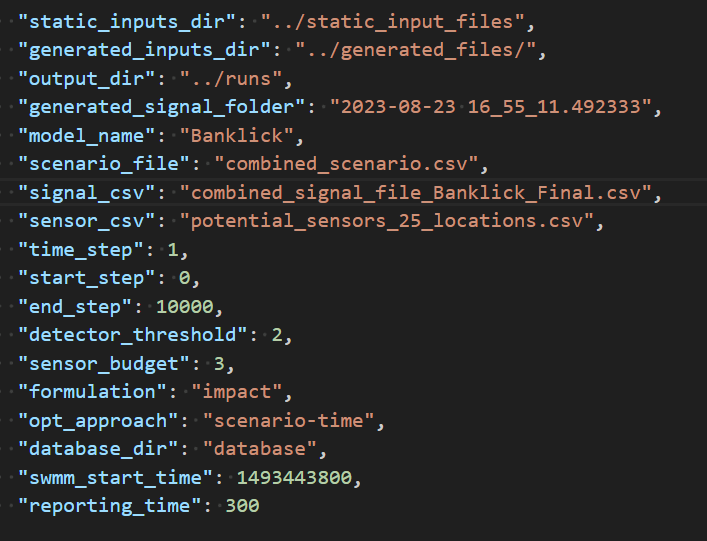
- The sections you will need to modify:
- generated_signal_folder (Folder where your signal file is located should be a datetime)
- scenario_file "combined_scenario.csv" - scenario csv
- "signal_csv": "combined_signal_file_Banklick.csv" - name of signal File
- "sensor_csv": "potential_sensors_25_locations.csv" - name of possible sensor locations file. This should be the same as in the 1st config.
- The Banklick config should be the config you are using it should be titled config.json if you need to modify the names of the config files in this folder.
- In the terminal run python manage.py chama_opt
Chama is not working in Windows
Chama is not selecting a final result when in windows.
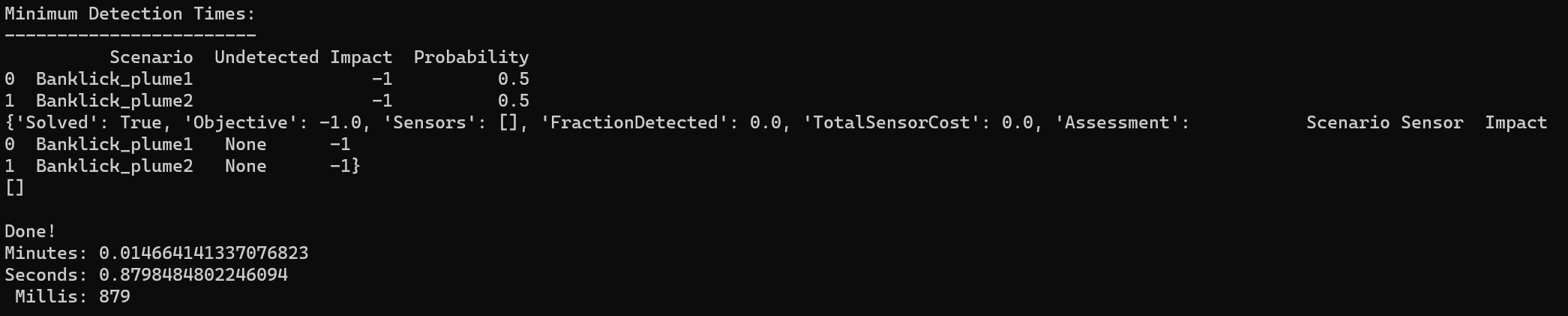
The exact same files do run in WSL.

Just to be sure an Example 6 Final was also checked. It is also not working.
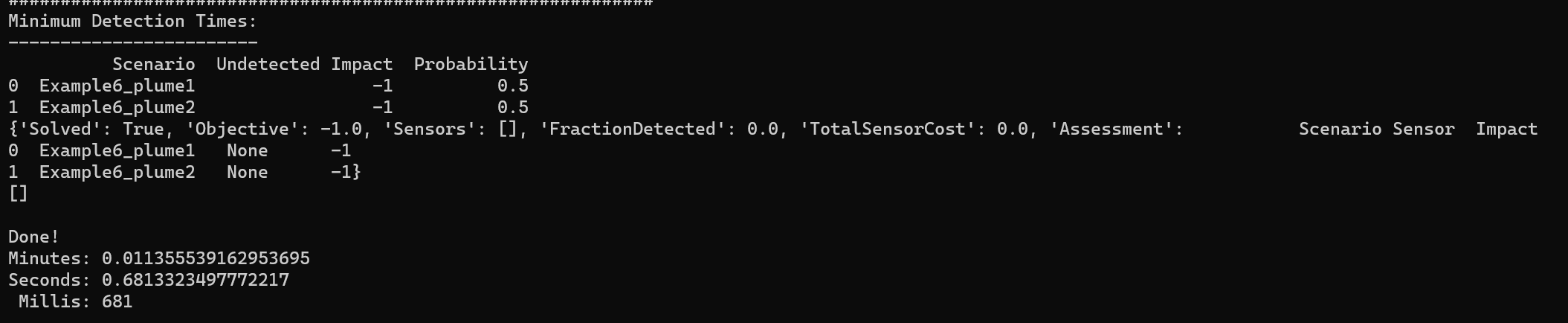
How did we miss this?
- We worked in WSL last phase.
- We only see results in the command prompt.
- We still get all the CSV data either way and this data does not change.
After some debugging the issue was found. The undetected impact values were too high. 599147937791 is the highest number we can use in windows. This caused the undetected impact to go to -1. When the undetected impact is -1 Chama does not place any sensors because we are not requiring it.