Chama Overview of Subtask 2
Chama Subtask 2 is generating and making a series of Scenarios. The scenarios are defined by the table below.
| Scenario ID | Optimization Approach | Rainfall Type | Chama Formulation |
|---|---|---|---|
| 1 | Minimize Detection Time | Single rain gage and a single plume | Impact |
| 2 | Minimize Damage (contaminated land) | Single rain gage and a single plume | Impact |
| 3 | Minimize Damage (contaminated pipes) | Single rain gage and a single plume | Impact |
| 4 | Minimize Detection Time | Single rain gage and multiple plumes | Impact |
| 5 | Minimize Damage (contaminated land) | Single rain gage and multiple plumes | Impact |
| 6 | Minimize Damage (contaminated pipes) | Single rain gage and multiple plumes | Impact |
| 7 | Minimize Detection Time | Multiple rain gages and a single plume | Impact |
| 8 | Minimize Damage (contaminated land) | Multiple rain gages and a single plume | Impact |
| 9 | Minimize Damage (contaminated pipes) | Multiple rain gages and a single plume | Impact |
| 10 | Minimize Detection Time | Multiple rain gages and multiple plumes | Impact |
| 11 | Minimize Damage (contaminated land) | Multiple rain gages and multiple plumes | Impact |
| 12 | Minimize Damage (contaminated pipes) | Multiple rain gages and multiple plumes | Impact |
| 13 | Maximize Monitored Area | Single rain gage and a single plume | Coverage |
| 14 | Maximize Monitored Area | Single rain gage and multiple plumes | Coverage |
| 15 | Maximize Monitored Area | Multiple rain gages and a single plume | Coverage |
| 16 | Maximize Monitored Area | Multiple rain gages and multiple plumes | Coverage |
| 17 | Minimize Scenario-Detection Time | Single rain gage and a single plume | Scenario-time coverage |
| 18 | Minimize Scenario-Detection Time | Single rain gage and multiple plumes | Scenario-time coverage |
| 19 | Minimize Scenario-Detection Time | Multiple rain gages and a single plume | Scenario-time coverage |
| 20 | Minimize Scenario-Detection Time | Multiple rain gages and multiple plumes | Scenario-time coverage |
Formulation
The formulation of the runs is less unique than at first glance. Each Scenario is unique but they are made up of parts that are not that unique.
The INP File
For each network there will only be 4 unique INP files right now. These inp files are all very similar. The inp files are:
- Single Raingage Single Plume
- Single Raingage Multiple Plume
- Multiple Raingage Single Plume
- Multiple Raingage Multiple Plume
Where we are measuring the contaminate.
The are only 2 locations where we are going to measure the contaminate at.
- Land
- Node(This includes Pipes as well.)
The Land contaminate will be measured at the Subcatchment as we need to measure the output buildup and that value is at subcatchment level. This will mean a change to the locations of sensors where the sensors are currently being placed at the outlet of a subcatchment (This is a junction) The sensor will be placed at the subcatchment instead.
Chama Formulation
- Impact
- Coverage
Optimization Approach
- Minimize Detection Time (Impact)
- Minimize Damage (Impact)
- Maximize Monitored Coverage area (Coverage)
- Minimize Scenario Detection Time (Coverage)
| Scenario ID | Inp File (Rain gage and Plume Types) | Contaminant type | Chama Formulation | Optimization Approach |
|---|---|---|---|---|
| 1 | Single Raingage Single Plume | Pipe/Node | Impact | Minimize Detection Time |
| 2 | Single Raingage Single Plume | Land | Impact | Minimize Damage |
| 3 | Single Raingage Single Plume | Pipe/Node | Impact | Minimize Damage |
| 4 | Single Raingage Multiple Plume | Pipe/Node | Impact | Minimize Detection Time |
| 5 | Single Raingage Multiple Plume | Land | Impact | Minimize Damage |
| 6 | Single Raingage Multiple Plume | Pipe/Node | Impact | Minimize Damage |
| 7 | Multiple Raingage Single Plume | Pipe/Node | Impact | Minimize Detection Time |
| 8 | Multiple Raingage Single Plume | Land | Impact | Minimize Damage |
| 9 | Multiple Raingage Single Plume | Pipe/Node | Impact | Minimize Damage |
| 10 | Multiple Raingage Multiple Plume | Pipe/Node | Impact | Minimize Detection Time |
| 11 | Multiple Raingage Multiple Plume | Land | Impact | Minimize Damage |
| 12 | Multiple Raingage Multiple Plume | Pipe/Node | Impact | Minimize Damage |
| 13 | Single Raingage Single Plume | Pipe/Node | Coverage | Maximize Monitored Coverage area |
| 14 | Single Raingage Multiple Plume | Pipe/Node | Coverage | Maximize Monitored Coverage area |
| 15 | Multiple Raingage Single Plume | Pipe/Node | Coverage | Maximize Monitored Coverage area |
| 16 | Multiple Raingage Multiple Plume | Pipe/Node | Coverage | Maximize Monitored Coverage area |
| 17 | Single Raingage Single Plume | Pipe/Node | Coverage | Minimize Scenario Detection Time |
| 18 | Single Raingage Multiple Plume | Pipe/Node | Coverage | Minimize Scenario Detection Time |
| 19 | Multiple Raingage Single Plume | Pipe/Node | Coverage | Minimize Scenario Detection Time |
| 20 | Multiple Raingage Multiple Plume | Pipe/Node | Coverage | Minimize Scenario Detection Time |
What needs to be done in order to make runs generate chama inputs.
- Setting up a contaminate Plume
- Set up rain gages
- Set up with singlar rain gage. (Modifications will have to be done to E6F)
- Set up multible rain gage. (Modifications will have to be done to both inp files)
- Rain gage is being put into the pyswmm run.
- I don't think we need that check the SWMMOPT project.
- Pyswmm needs to look at the continamte at the following locations
- Contaminated Land - Buildup.
- Contaminated pipes - Polutant Quality at each conduit.
- Otherwise - Polutant Quality at each node.
How to create a working Django Chama.
- What needs to be done to generate chama inputs?
- What are the changes that need to be made to the inp file before we generate the chama inputs?
- Rain gages
- (Note there are multiple rain gages in each example already)
- Edits might need to be made to the original inp file so that all rain gages are one to one with the time-series rain data. (Example 6 Final)
- Singular Rain gage
- A dropdown should appear and the Modeler should choose on of the available rain gages.
- Once a rain gage has been chosen If a singular rain gage is used then all the subcatchment rain gages should be changed to the selected rain gage.
- Multiple rain gages.
- Rain gages are defined by subcatchment.
- We need to insure that only 1 rain gage is ued for each subcatchment.
- The modeler needs a good way of defining the subcatchment for particular rain gage. (Banklick is going to be the pain)
- A modeler will either need a way to drag and drop items in a list to the correct drainage.
- Filter on a map? (Zillow like ability only for rain gages?)
- Dropdown for a rain gage for each subcatchment.
- User uploads a csv with the subcatchment name and the rain gage assigned.
- Once the rain gages are chosen then the subcatchment are assigned a rain gage.
- Contaminate Plumes
- How are we modeling plumes?
- Buildup
- Washoff
- Initial Contaminate
- Dirty rain
- Other ways?
- How do we shape the plume
- Is is a continuous amount over an entire subcatchment?
- Can we start at the node level and make that node have the highest contaminate and then radiate out with a lower concentration in a circle?
- Can we do this pragmatically or using qgis?
- 1 or 2 plumes.
- Where do we place the plumes?
- It should be random but how do we go about that?
- Random number generator?
- If we are modeling a plume using subcatchments assign a number to each subcatchment and randomly draw the subcatchment.
- For the Node example do the same randomly select a node.
- Random number generator?
- It should be random but how do we go about that?
- How many plumes
- We have both one or 2 plumes to place depending on the scenario.
- How are we modeling plumes?
- Rain gages
- Other things we will need in the config file.
- Select the pollutant type (Currently will be hardcoded to TSS. )
- The output of this is a CSV file that has the signals data in it.
- What are the changes that need to be made to the inp file before we generate the chama inputs?
- What needs to be done to run chama_opt. All of these dependencies can be found in the Config.json for the chama_opt.py
- There are 3 CSVs that are accessed when running chama_opt
- Signals.csv which is what we create when we run generate chama inputs.
- Scenario.csv
- Sensor.csv which is where the possible sensor locations come in.
- Three values are used to set up the sampling time array in Chama_opt.py
- time_step
- start_step
- end_step
- detector_threshold - The minimum amount of pollutant detected.
- sensor_budget - The total budget that can be used for all sensors. (The cost for the sensors can be found in sensor.csv)
- formulation - there are 3 types of formulation We are currently only working with the first
- Impact - The Impact formulation is used to determine optimal sensor placement and type that minimizes impact, where impact can be the sensor’s detection time or some other measure of damage.
- Coverage - The Coverage formulation is used to place sensors that maximize the coverage of a set of entities, where an entity can be a scenario, scenario-time pair, or geographic location.
- Grouping Constraints - Constraints can be added to both the Impact and Coverage formulations to enforce or restrict the number of sensors allowed from certain sets.
- coverage_type
- Minimum detection time
- Minimize Damage
- Maximize Monitored Area
- Minimize Scenario-Detection Time (Scenario-time coverage)
- There are 3 CSVs that are accessed when running chama_opt
Subcatchment Area for Example 6 Final
| Junction ID | Total Area | Number of Subcatchments | List of Subcatchments |
|---|---|---|---|
| J1 | 3.404 | 4 | S_IT_1, S_IT_2, S1.2, S1.3 |
| J3 | 1.29 | 1 | S3.1 |
| J6 | 1.65 | 1 | S4.1 |
| J9 | 2.40 | 1 | S4.4 |
| J10 | 7.12 | 2 | S5, S7 |
| J11 | 1.98 | 1 | S6 |
| J12 | 1.21 | 1 | S1.1 |
| J13 | 3.443 | 4 | S_IT_3, S_IT_4, S2.2, S2.3 |
| J14 | 1.30 | 1 | S2.1 |
| J15 | 1.058 | 2 | S_FS_1, S3.2 |
| J16 | 2.807 | 4 | S_FS_3, S_FS_4, S4.2, S4.3 |
| J17 | 1.423 | 2 | S_FS_2, S3.3 |
Pollutant Quality
We can get the pollutant Quality in several diffrent ways.
- Node - polut_quality
- Link - polut_quality
- Subcatchment - polut_quality
- Subcatchment - Buildup
We will be using 1 and 4 to start with in generating the chama inputs. If I add the contaminate amount by using pollutant then it will apply the contaminate into the entire newtork at the same level that is not really how we want to do this right now. Since I want to do this with a plumne and not a contaminate over the eintire area then I should not be using the pollutant.
Chama Early Detection
When running Chama for early detection a pattern has been noticed.
If there are multiple sensors that detect the pollutant at the same time, then Chama will pick one of these sensors and not list all posible sensors that picked up the pollutant at that timestep.
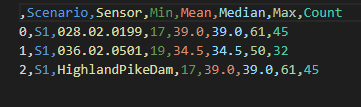
In the example above It is clear that there are 2 sensors that detect the pollutant at 17 time-steps into the simulation. The 2 sensors are 028.02.0199 and HighlandPikeDam. However when we run chama and get the output results we are only getting 1 sensor as that optimum output. That sensor is 028.02.0199. At the time we are documenting this we are not weighing the results or doing anything that would effect the outcome to support 028.02.0199 over HighlandPikeDam.